Robotics and smart devices
This resource helps Digital Technologies teachers understand robotics and smart devices and how these can be included as context for learning, aligned with the Australian Curriculum from Foundation to Year 10.
What you'll find
- Explanations of sensors, data, automation and control systems
- Ideas that support the progressive development from Foundation to Year 10
- Practical classroom activities
- Resources to help in planning and assessment
Learning about robotics and smart devices
Robotics and smart devices do not appear as a separate set of content descriptions in the Australian Curriculum. Instead, robotics and smart devices can be used as an authentic and engaging context to apply learning about core concepts.
Through designing, creating, programming and evaluating robotic and smart devices solutions, students can develop:
- computational thinking skills, including decomposition, pattern recognition, abstraction and algorithm design
- systems thinking by exploring how components work together as a system
- design thinking through identifying needs and developing solutions
- programming skills through creating, testing and refining instructions
- problem-solving and critical thinking capabilities
- collaboration and communication skills when working with others.
What are robotics and smart devices?
Robotics and smart devices are technologies that can follow programmed instructions and use information from their surroundings to perform tasks and help people solve problems.
A simpler explanation can help …
Robots and smart devices can help people complete tasks. They follow instructions programmed by people. Some can sense what is happening around them and respond.
Why is it relevant?
Robotics and smart devices provide authentic contexts for students to investigate contemporary and emerging technologies that are increasingly shaping homes, workplaces and communities. Observing their programmed instructions creating movement, light and other tangible behaviours helps students understand both digital systems and algorithms.
Additionally, the sensors on robots and smart devices are a source of data that students can collect and analyse.
Key terms in the curriculum
These terms and simple definitions may be of use when investigating this topic with your students.
| Robot | A machine that can perform tasks automatically or under human control |
|---|---|
| Smart device | A device that can collect information and respond or communicate in useful ways |
| Sensor | A component that detects changes in the environment, such as light, sound, movement or temperature |
| Actuator | Any component that takes instructions from a program and causes something to happen in the physical world |
| Program | A set of instructions that tells a device what to do |
| Internet of Things (IoT) | Everyday devices connected to the internet that can communicate and exchange information |
| Robot | A robotic floor vacuum follows a programmed route or uses sensors to navigate around a home while cleaning dirt and dust from the floor. |
|---|---|
| Smart devices | A smart fan adjusts its speed or turns on and off based on user input through a voice assistant. |
| Sensor | A motion sensor detects when a person is at the door and triggers a security camera to record an image or video. |
| Actuator | DC motors make wheels spin.
|
| Program | A pool filter system can be programmed to operate automatically when specific conditions are met, such as at certain times of the day or when water quality reaches a set level. |
| Internet of Things (IoT) | In a smart home, IoT devices include lighting, heating and cooling systems that can be monitored and adjusted using a smartphone, tablet or voice assistant. |
Connections to other topics
This topic has connections to the following topics:
What to teach?
Robotics and smart devices can be introduced early, from Year 1, and build in complexity through to Year 10.
Here’s how the concept develops across year bands:
Robotics and smart devices in Years 1-2
Expectation for this band
Students investigate robotics when they:
- order and follow step-by-step instructions in the correct sequence
- create and test simple algorithms to control a robot such as a Bee-Bot
- use positional and directional language to describe a robot’s movement
- predict and describe a robot’s path on a grid
- represent algorithms using arrows, symbols or images
- identify and correct errors in simple algorithms.
The focus is on applying their knowledge of algorithms to control a simple robot or ‘human robot’.
What this looks like in practice
Students investigate robotics when they:
- use positional and directional language to guide a ‘human robot’ through a grid
- give a Bee-Bot instructions using the push-button keypad to move to a specified location
- predict and describe the path a Bee-Bot will follow based on a sequence of instructions
- represent a Bee-Bot’s movements using arrows, symbols or simple maps
- recognise when an instruction given to a Bee-Bot or ‘human robot’ is incorrect, then correct the error so it follows the intended path.
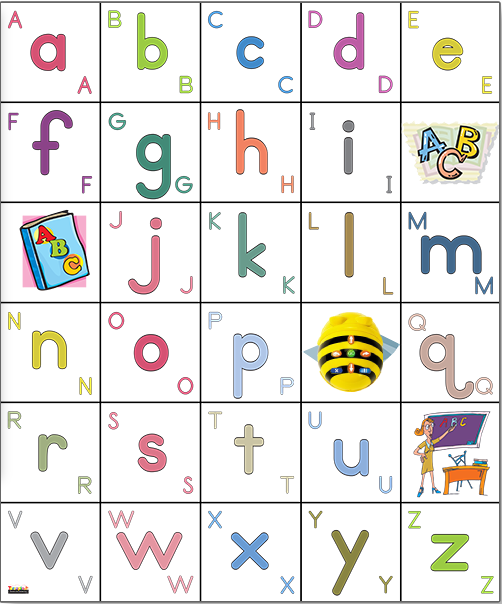
Image credit: Bee Bot emulator, Terrapin
By the end of this activity, students can give a Bee-Bot instructions using the push-button keypad to move to specified locations on a grid to spell a word.
Retrieval: Show a Bee-Bot, which is a push-button floor robot. What buttons can we use to control a Bee-Bot? How does the Bee-Bot know where to go?
Learning hook: Provide a mat with letters of the alphabet arranged in a grid. Explain that Bee-Bot wants to write a message, but it cannot spell. Can we help it spell the word ‘cat’?
Task: Model how to move Bee-Bot on the alphabet mat from the start position to a letter. Explain the instructions you are programming, for example: ‘Four spaces forward, turn right, then two spaces forward gets Bee-Bot to the first letter of my word: ‘c’ for ‘cat’.
Get input from the class to complete spelling the word ‘cat’. Show another three-letter word, storing the commands as a program. Students in teams can explore using the Bee-Bot depending on access. Ask students to predict where the Bee-Bot will travel. If it makes an error, ask ‘What went wrong?’ ‘Which instruction should be changed?’
Reflection: After programming Bee-Bot, ask students:
- What instructions did you give Bee-Bot?
- Did your program work?
This activity can be conducted virtually using the Bee Bot emulator (opens external website in a new window) , choosing Alphabet mat from the drop-down menu.
Evidence of learning
You might notice that students:
- sequence instructions to move a Bee-Bot or human robot to achieve a goal
- explain how their program moves a Bee-Bot or human robot to a specific location
- predict the path a Bee-Bot or human robot will follow before running a program
- test and fix instructions when a Bee-Bot or human robot does not reach the intended location.
Common misconceptions or errors to watch for
- Thinking the Bee-Bot knows where to go without instructions
- Forgetting to cancel the previous Bee-Bot program
- Confusing and misusing left and right turns
- Miscounting the required number of steps to move
- Misjudging how many steps are needed to reach a location.
Address these explicitly during modelling and discussion.
Robotics and smart devices embedded in Years 1-2 Digital Technologies
These examples illustrate the connection between content descriptions and the teaching activities in this guide.
| Instructions for a push button or human robot |
|---|
Relevant ACARA content descriptions
Examples in practice
|
Robotics and smart devices in Years 3-4
Expectation for this band
Students learn about robotics and smart devices when they:
- program a robot, such as a Sphero, Dash or Ozobot, to follow a sequence of movements that includes decisions and repetition to complete a task
- create and test programs on a physical computing device, such as a micro:bit, that control outputs such as sounds, symbols and messages on an LED display
- assemble a robotic device from a buildable kit by connecting structural components, sensors, actuators and a programmable controller, then test how the physical design and program work together to perform a task
- program a physical computing device, such as a micro:bit, to use sensor data and make decisions that trigger different actions when specified conditions are met.
The focus is on building confidence with creating and testing programs for robots and physical computing devices that use inputs, outputs and simple decision-making to complete tasks.
What this looks like in practice
Students learn about robotics and smart devices when they:
- use the micro:bit temperature sensor to create a weather alert system, testing and implementing a visual program that uses sensor data to automatically trigger an alert when the temperature reaches 35°C
- use a Sphero distance sensor to create a robot navigation model, predicting how the robot will respond to obstacles, then testing and implementing a visual program that uses sensor data to automatically stop or change direction when an object is detected
- assemble and program a robotic device from a buildable kit to solve a practical problem, such as navigating around obstacles or transporting an object. They test how the structural components, sensors, actuators and program work together, refining the design to improve the robot’s performance.
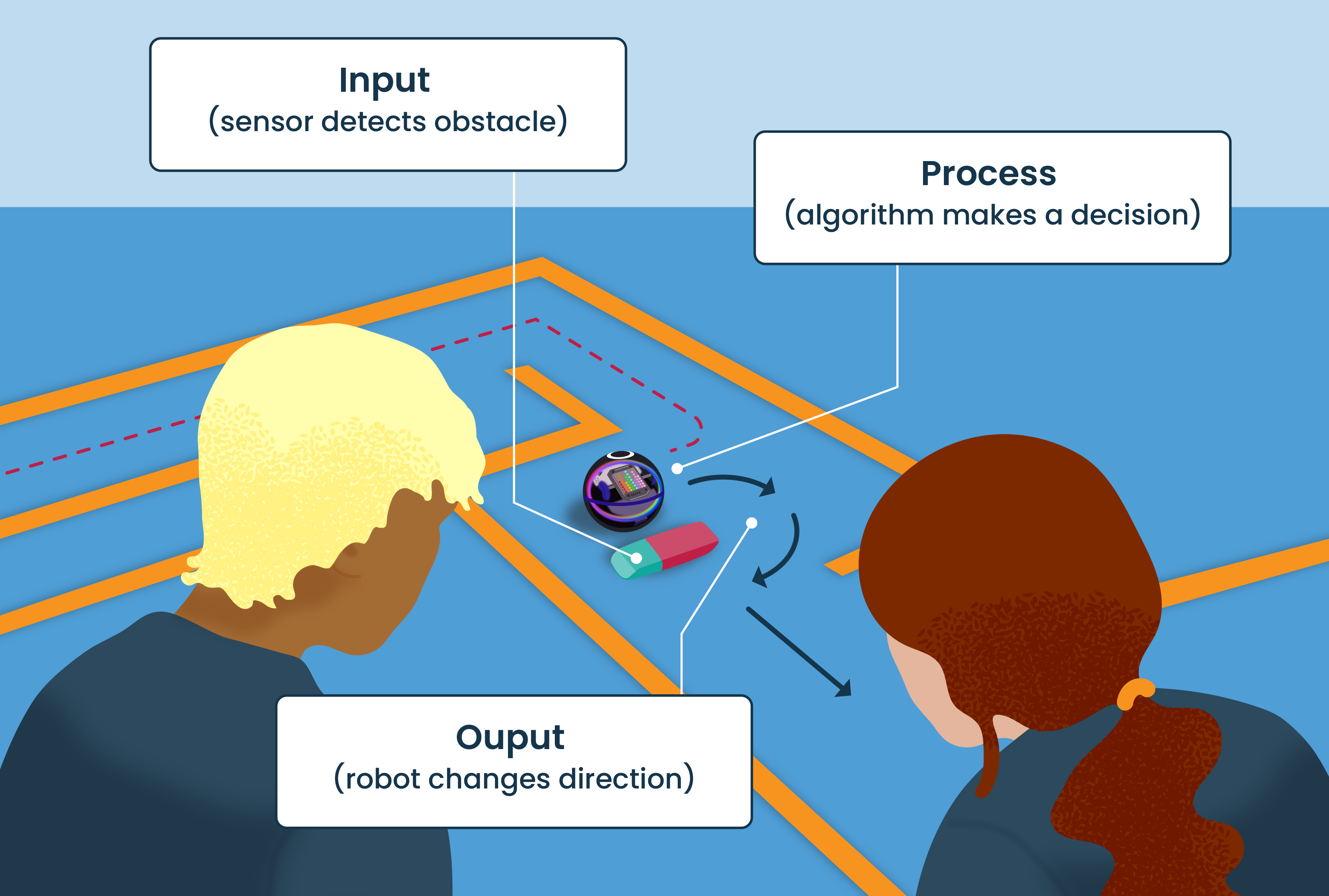
By the end of this activity, students can identify the inputs and outputs of a digital system, explain how sensors collect data, and implement, test and describe simple algorithms that use sensor data to make decisions.
Retrieval: What instructions would you need to give a blindfolded person to help them safely navigate to a specific location?
Establish that reaching a goal requires a sequence of clear instructions, which we call an algorithm. When there are obstacles, additional instructions or decisions may be needed. Digital systems such as robots also rely on instructions to navigate and complete tasks.
Learning hook:
- How does a robot know where to go?
- What happens if it bumps into an obstacle?
- How could we give the robot instructions to help it reach its goal?
Task: Students investigate how a robot (for example, a Sphero) can use instructions to navigate a simple maze. Begin by programming a sequence of instructions to move the Sphero from a starting point to a goal. Once students have tested their algorithm, introduce an obstacle that blocks the robot’s path. Discuss why the original instructions no longer work and how the algorithm could be changed to respond when an obstacle is encountered.
Introduce the prompt: ‘Our first algorithm told the robot exactly where to go. But what happens when something unexpected gets in the way? How can we program the robot to make a decision when it detects an obstacle?’
Discuss that some robots can use sensors to detect objects around them. The robot can be programmed with a rule such as:
- move forward
- if an obstacle is detected, stop and turn
- continue moving forward.
Reflection: Ask, ‘How did your algorithm help the robot reach its goal?’ ‘What happened when the robot encountered an obstacle?’ ‘How did the robot know when to change direction?’ ‘Why are both sensors and algorithms important in digital systems?’
Evidence of learning
You might notice that students:
- correctly navigate a robot using a sequence of instructions
- describe the algorithm used by a robot or physical computing device
- explain the role of a sensor in collecting data
- modify instructions to improve the solution
- use appropriate terminology such as ‘input’, ‘output’, ‘sensor’, ‘algorithm’ and ‘decision’.
Common misconceptions or errors to watch for
- Thinking a robot automatically understands its goal without the need for instructions
- Believing a sensor makes decisions, rather than recognising that the sensor collects information.
- Assuming there is only one correct algorithm and not recognise that instructions can be tested, modified and improved to achieve the same outcome.
Address these explicitly during modelling and discussion.
Robotics and smart devices embedded in Years 3-4 Digital Technologies
These examples illustrate the connection between content descriptions and the teaching activities in this guide.
| Automating outcomes |
|---|
Relevant ACARA content descriptions
Examples in practice
|
Robotics and smart devices in Years 5–6
Expectation for this band
Students learn about robotics and smart devices when they:
- explore how robots and smart devices use inputs, processing and outputs to perform tasks
- design and create programs that control the behaviour of robots and smart devices
- use sensors and data to enable robots and smart devices to respond to their environment
- apply algorithms, variables and conditional statements to support decision-making and automation
- test, evaluate and refine robotic and smart device solutions to improve their effectiveness
- investigate how robotics and smart technologies are used in homes, workplaces and communities to solve problems and assist people.
The focus is on understanding how smart technologies use sensors and data to respond and make decisions, and how students can design, program and improve automated solutions to solve real-world problems.
What this looks like in practice
Students learn about robotics and smart devices when they:
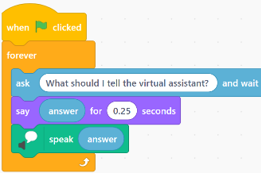
- develop and test a voice-controlled smart device simulation using text-to-speech and text recognition in Scratch, enabling users to control virtual appliances (such as lights or fans) with simple commands that mimic real-world robotics and smart home technologies
- use the micro:bit’s built-in sensors to collect data about light, temperature, sound, movement and direction, enabling smart devices and robots to respond automatically to changes in their environment
- program a robot such as a Sphero to use variables as part of its decision-making process, allowing it to react to different situations, such as monitoring the distance to objects and adjusting speed according to the stored distance value.
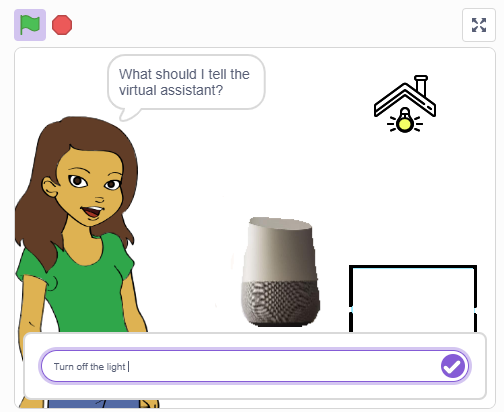
Image credit: Scratch
By the end of this activity, students can create and test a voice-controlled smart device simulation in Scratch that responds to user commands to control virtual appliances.
Retrieval: Show students the phrase ‘Turn on the living room light.’
Ask: ‘What words does the computer need to recognise?’ ‘How might the computer know which appliance to control?’
Learning hook: Students explore how voice assistants and smart home devices can respond to commands to control appliances such as lights and fans. Discuss examples of smart technologies used in homes and how they use inputs and outputs to perform actions automatically.
Task: Students use Text to Speech blocks in Scratch to create a smart device simulation that responds to user commands and controls virtual appliances. to create a smart device simulation that responds to user commands and controls virtual appliances.
Present the challenge of creating a program that recognises text input and performs an action such as turning a light or fan on or off.
Discuss the types of commands that might typically be used, for example:
- turn on/turn off
- lights on/lights off
- fan on/fan off.
Emphasise short commands that are easy for the program to recognise.
Suggested steps:
- Students select a home appliance to include in their program, such as a light, fan or television, and create it as a sprite. Students can upload an icon or draw their own sprite.
- Add a character sprite to act as a virtual assistant. Use an Ask block to collect text input from the user. Display the response on the screen and use a Speak block so the virtual assistant repeats the command.
- Program the appliance sprite to respond to commands using If/then and Operator blocks. For example, if the answer contains the word on, the appliance switches to an ‘on’ costume. If the answer contains the word off, the appliance switches to an ‘off’ costume.
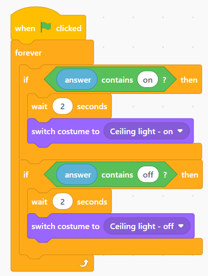
- Extend the program by adding more appliances. Modify the code so that both the appliance name and the command are recognised, using logical operators to ensure only the intended appliance responds.
- Teachers may provide a program created in Scratch for students to remix; refer to Home automation sample code (opens external website in a new window).
Reflection: Students evaluate the effectiveness of their smart device simulation by testing a range of commands and considering how well the system responds. They reflect on how voice-controlled technologies are used in everyday life and identify improvements that could make their simulation more reliable, efficient or user-friendly.
Evidence of learning
You might notice that students:
- create and test a program in a visual programming language such as Scratch that uses text recognition and text-to-speech to control a virtual appliance through user commands
- apply conditional statements (if/then) to enable a smart device or robot to respond appropriately to different inputs
- use micro:bit sensor data to detect changes in the environment and trigger automated actions
- collect, store and update data using variables to support decision-making within a robotic system
- remix, modify and refine code to improve the accuracy, reliability and functionality of a smart device or robot.
Common misconceptions or errors to watch for
- Incorrectly applying conditional statements, causing a smart device or robot to respond unexpectedly
- Experiencing difficulties connecting their program to a physical micro:bit and troubleshooting why it is not working as expected
- Being unable to create variables or use them effectively to influence a robot’s behaviour or decisions.
Address these explicitly during the task, using questioning and feedback.
Robotics and smart devices embedded in Years 5-6 Digital Technologies
These examples illustrate the connection between content descriptions and the teaching activities in this guide.
| Automating a solution |
|---|
Relevant ACARA content descriptions
Examples in practice
|
Robotics and smart devices in Years 7-8
Expectation for this band
Students can:
- design algorithms using flowcharts and pseudocode to solve robotics and sensor-based challenges
- use branching, iteration and nested control structures to control the behaviour of robots and digital systems
- implement, modify and debug programs in a general-purpose programming language, such as Python, Arduino C/C++ or ROBOTC
- evaluate and refine digital solutions based on testing data and changing design requirements.
The focus is on designing and implementing algorithms as programs that enable robots and physical computing devices to sense, respond to and carry out a task.
What this looks like in practice
Students learn about robotics and smart devices when they:
- design and test algorithms with flowcharts and pseudocode to move a robot to trace out polygons and other repeatable shapes on the floor, then implement and refine the solution using functions
- design algorithms for a robot to navigate a course and respond to sensor inputs before implementing the solution in code
- program, modify and debug a robot using Python, Arduino C/C++ or ROBOTC to complete an autonomous challenge
- create, test and debug a simple ‘rock, paper, scissors’ game in Python by programming a micro:bit
- design and implement a race-timing system using a physical computing device such as micro:bit that uses laser gates to detect and record the time of a student-designed vehicle.
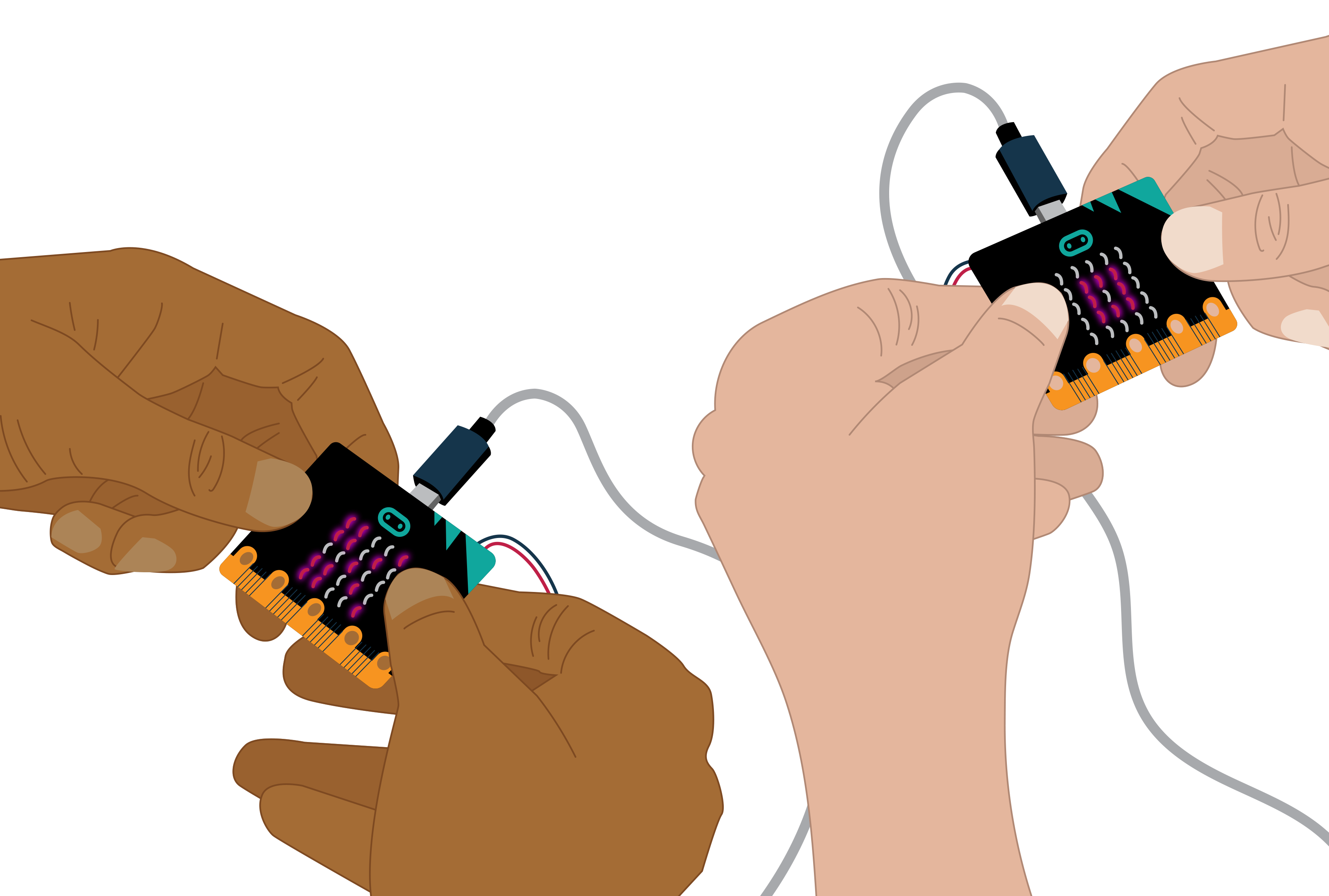
By the end of this task, students will be able to create, test and debug a simple ‘rock, paper, scissors’ game in Python by programming a micro:bit to use the ‘on shake’ accelerometer sensor, random number generator and branching statements to produce different outcomes on the display.
Retrieval: How could you use a 5 × 5 LED grid to represent rock, paper and scissors?
Learning hook: How could you use a micro:bit to play ‘rock, paper, scissors’? How would you program it to randomly select and display one of the three options when it is shaken?
Task:
- Open the Python Editor and connect your micro:bit.
- Create LED images to represent rock, paper and scissors.
- Program the micro:bit to wait until it is shaken.
- Generate a random number from 0 to 2.
- Use branching statements (if/else) to display the correct image for each number.
- Download your program and test it on the micro:bit.
- Debug any errors so the program works reliably when the micro:bit is shaken.
- Improve the program with a loop so that it returns to waiting each time.
Reflection:
- How did the micro:bit use the shake input to trigger an action?
- How did the program use random numbers and branching to determine which image was displayed?
- What errors did you encounter, and how did you debug them?
Optional/extension:
- Use the micro:bit’s radio functionality to make two micro:bits play against each other and correctly decide each time who wins.
Evidence of learning
You might notice that students:
- design algorithms using flowcharts and pseudocode
- develop programs that use sensors, control structures and functions to complete a defined task
- modify and debug code to improve program functionality and reliability
- create robotic and smart device solutions that respond appropriately to inputs from their environment
- evaluate and refine solutions using testing data and feedback.
Students demonstrate learning by creating and implementing programs that enable robots and physical computing devices to operate as intended.
Common misconceptions or errors to watch for
- Having difficulty troubleshooting and debugging programs when errors occur, often making changes without systematically testing possible causes for the errors
- Being unsure of how to correctly use sensors in a program
- Not understanding how data from sensors is used to trigger decisions and actions within a program
- Having difficulty working out whether a problem is caused by the hardware connection, sensor configuration or program code.
Address these explicitly through modelling and discussion.
Robotics and smart devices embedded in Years 7-8 Digital Technologies
These examples illustrate the connection between content descriptions and the teaching activities in this guide.
| Algorithm design to automate a robot |
|---|
Relevant ACARA content descriptions
Examples in practice
Note: Sphero uses a visual programming environment. While students can develop and represent algorithms that align with AC9TDI8P05, the activity does not fully address content descriptions requiring text-based programming. |
| Automating a robot or physical computing device |
|---|
Relevant ACARA content descriptions
Examples in practice
|
| Gathering data via a robot or smart device |
|---|
Relevant ACARA content descriptions
Examples in practice
|
Robotics and smart devices in Years 9-10
Expectation for this band
Students can:
- explain how logical operators (AND, OR, NOT) can be used when automating a robotic device using sensor inputs
- design algorithms involving logical operators and represent them using flowcharts and pseudocode
- implement and modify algorithms by converting pseudocode into Python or Arduino C/C++ and integrating sensor inputs
- create and apply a range of test cases to validate that their algorithm works under different conditions
- predict expected outputs, run trials, and compare actual outputs with expected outcomes
- identify and correct errors through debugging
- refine and improve their algorithms and code based on testing and validation results.
The focus is on students independently applying programming processes when automating solutions.
What this looks like in practice
Students use investigate robotic and smart devices when they:
- program an Arduino-based automated system that responds to multiple sensor inputs, such as a smart greenhouse using light and soil-moisture sensors
- design, program and test a robot that follows lines to complete a complex task, while detecting and avoiding obstacles using a light sensor and an ultrasonic distance sensor.
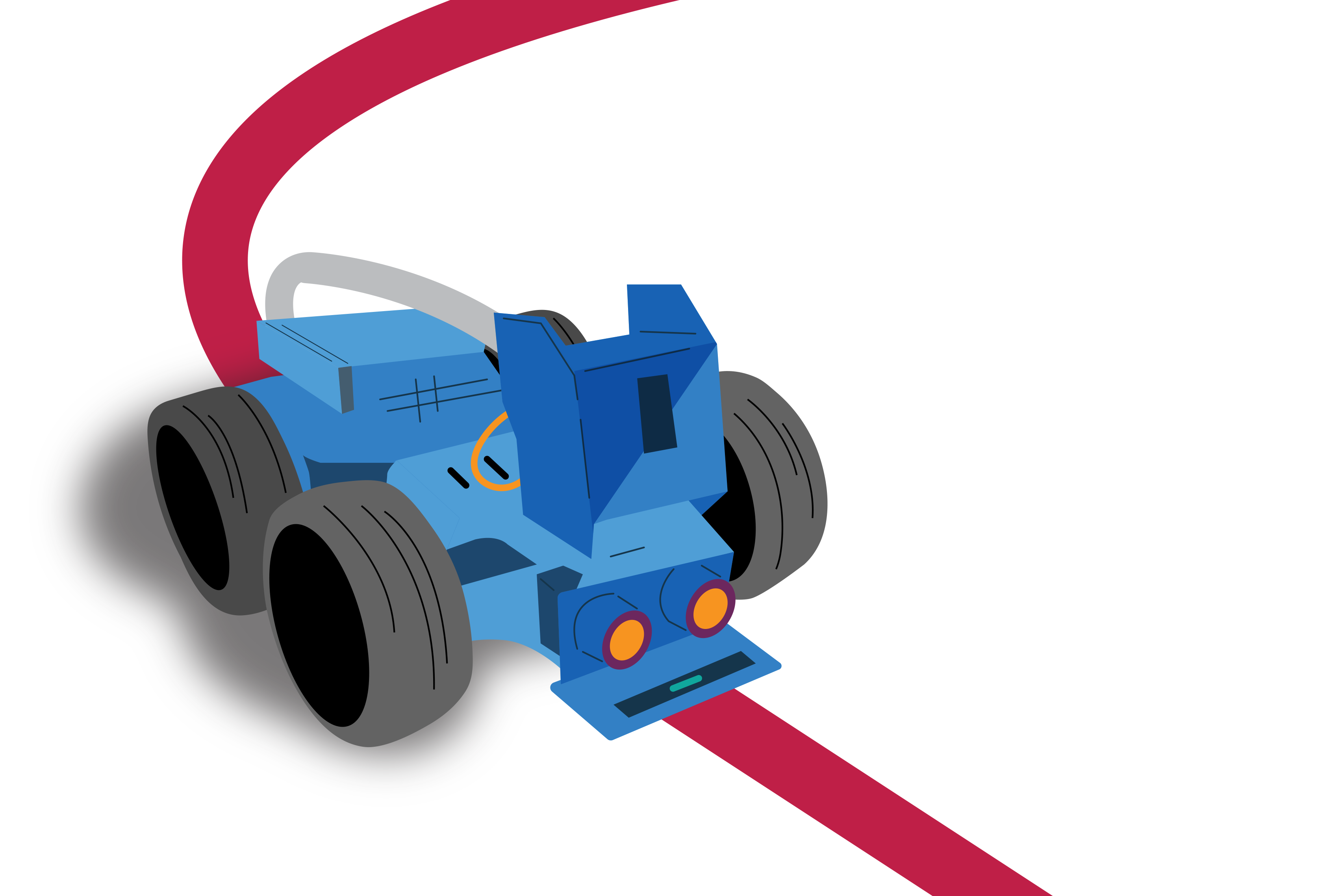
By the end of this introductory lesson, students will be able to design and represent an algorithm using logical operators (AND, OR, NOT) to control a robot that follows a path and responds to obstacles. They will implement, test and refine their solution using sensor inputs and a range of test cases to validate its effectiveness.
Retrieval: What are two important things a robot needs to do to move safely along a path?
Possible student responses:
- Stay on the path (follow the line).
- Detect and avoid obstacles.
- Stop when there is a hazard ahead.
- Use sensors to make decisions.
Learning hook: When you order something online, there is a good chance a robot helps move products around a warehouse. These robots must follow designated routes while detecting and avoiding obstacles. How can we program a robot to make these decisions independently?
Task: As a class, investigate how a light sensor and distance (ultrasonic) sensor help a robot move safely along a path. Students then design an algorithm that enables a robot to follow a marked line and respond to obstacles. They create a flowchart and pseudocode using logical operators (AND, OR, NOT).
Provide access to a robotic device that uses Python or Arduino C/C++, such as VEX, micro:bit, Lego or Makeblock. Students program the robot to:
- move forward when the line is detected AND no obstacle is present
- stop and avoid detected obstacles
- search for the line when it is no longer detected.
Students develop a range of test cases and predict the robot’s expected behaviour. They test the robot under different conditions, compare actual and expected outcomes, and refine the algorithm and code to improve performance.
Reflection:
- How did the light sensor and distance sensor help the robot make decisions while moving along the path?
- Which logical operators (AND, OR, NOT) did you use, and how did they affect the robot’s behaviour?
- What changes did you make to improve the robot’s performance after testing and validating your solution?
Evidence of learning
You might notice that students:
- design an algorithm that uses logical operators (AND, OR, NOT) to respond to multiple sensor inputs
- represent their solution using a clear flowchart and pseudocode
- implement and test a program using a robotic or physical computing device and sensors
- create and apply test cases to compare expected and actual outputs
- refine and justify improvements made to their algorithm and code based on testing results.
Common misconceptions or errors to watch for
- Confusing logical operators by using AND when OR is required, resulting in the robot or device not responding as intended
- Creating algorithms that do not account for all possible sensor inputs, such as losing the line or detecting an obstacle
- Doing minimal testing of the program rather than using a range of test cases to compare expected and actual outputs and identify errors.
Address these explicitly through teacher modelling, questioning and feedback.
Robotics and smart devices embedded in Years 9-10 Digital Technologies
These examples illustrate the connection between content descriptions and the teaching activities in this guide.
| Automating a robot or physical computing device |
|---|
Relevant ACARA content descriptions
Examples in practice
|
| Gathering data via a robot or smart device |
|---|
Relevant ACARA content descriptions
Examples in practice
|
Plan your teaching
Explore sample units and lessons.
These sample units can be used to incorporate elements of robotics and smart devices.
Years 1–2: Solving simple problems, in particular Instructing a floor robot
Years 3–4: Programming a simple digital solution
Years 5–6: Designing a digital solution, in particular Design an automated solution
Years 7–8: Creating a digital solution, in particular Robots and programmable machines
Years 9–10: Programming
Use this planning template (opens docx in a new window) to record relevant information as you view a scope and sequence topic for your year level.
Research-informed teaching
Evidence-based approaches
- Unplugged learning
- Dual coding (visual and verbal)
- Worked examples with gradually reduced scaffolding
Unplugged learning
Research from CS Unplugged shows that introducing computing concepts without devices helps students focus on core ideas before adding technical complexity.
What this looks like in practice:
- Begin with an activity that does not require a device.
- Use familiar materials, physical simulations, card-based scenarios or movement to model how a problem can be broken into parts, which details matter, and what patterns or rules can be identified.
- Prompt students to explain their reasoning: what they kept, what they ignored, what repeated, and why their rule or solution works.
Example:
Students act as robotics engineers testing an algorithm before it is deployed on a physical robot. Using a mapped course, sensor-input cards and test-case scenarios, students determine how a robot should respond when a line is detected, lost or blocked by an obstacle. They evaluate how logical operators (AND, OR, NOT) influence decision-making and refine their algorithms based on the outcomes.
Dual coding
Research synthesised by Richard E Mayer shows that students learn new concepts more effectively when information is presented using both words and visuals, reducing cognitive load and supporting deeper understanding.
What this looks like in practice:
- Present new ideas using both spoken or written explanations and visual representations.
- Use diagrams, images, symbols or simple models alongside verbal descriptions.
- Explicitly link the visual elements to the language being used.
- Revisit the concept using both modes together to reinforce understanding.
Example:
Use flowcharts, sensor diagrams and visual representations of robot movements alongside verbal explanations to understand how logical operators influence a robot’s decisions.
Spoken: ‘If the robot detects the line AND does not detect an obstacle, it should move forward.’
- Visual:
- A simple flowchart
- Icons or images of a line sensor and distance sensor
- A diagram showing the robot on a path with an obstacle ahead.
Worked examples and scaffolding
Research synthesised by the Australian Education Research Organisation shows that modelling worked examples and gradually reducing support improves learning of complex procedures.
What this looks like in practice:
- Model a complete example before asking students to work independently.
- Make the thinking process explicit by explaining decisions and steps as they occur.
- Provide structured support such as prompts, templates or partially completed examples.
- Gradually remove scaffolds as students gain confidence and competence.
Example:
- Worked example: model a complete algorithm for a robot that follows a line and responds to obstacles using logical operators (AND, OR, NOT). Demonstrate how the algorithm is represented as a flowchart or pseudocode.
- Partially completed example: provide students with an incomplete flowchart, pseudocode or test table and support them to complete the missing decision points, logical operators or actions.
- Independent algorithm design: students design, represent, implement and validate their own algorithm for a robot that follows a path and responds to sensor inputs, using test cases to refine their solution.
Check understanding
- 1–2: Work sample and checklist
- 3-4: Work sample
- 5-6: Rubric
- 7-8: Rubric
- 9-10: Work sample
Teachers can assess student learning in a range of ways, including through checklists, observations, rubrics and student work samples. The examples below focus specifically on assessing students’ understanding of algorithms, which is one part of computational thinking.
- Years 1–2:
- Use the work sample Human robot programming (opens external website in a new window) to assess students’ skills and knowledge of following and describing basic algorithms involving a sequence of steps. Note: this example incorporates Languages: German.
- Use the assessment section of the lesson Spelling bee, which provides a simple checklist to support assessment.
- Years 3–4: Use the work sample Digital project: Rescuing Rapunzel (opens external website in a new window) to assess students’ skills and knowledge of creating simple digital solutions and using provided design criteria to check if solutions meet user needs.
- Years 5–6: Refer to the assessment section of Design an automated solution. This resource includes a rubric: design an automated solution.
- Years 7–8: Refer to the assessment section of Robots and programmable machines for a rubric. This pathway suits programming of a physical computing device such as the micro:bit, or can be adapted to suit robotics focus.
- Years 9–10: Digital project: Python game development. (opens external website in a new window) This work sample includes annotations about how a student designed and validated algorithms. Although the context is game development, similar processes can be applied to robotics and physical computing projects involving sensors, automation and testing.
Deepen your understanding
Explore these resources for further background to help teach about AI: