Algorithms
This resource helps Digital Technologies teachers make sure their teaching of algorithms
is aligned with the Australian Curriculum from Foundation to Year 10.
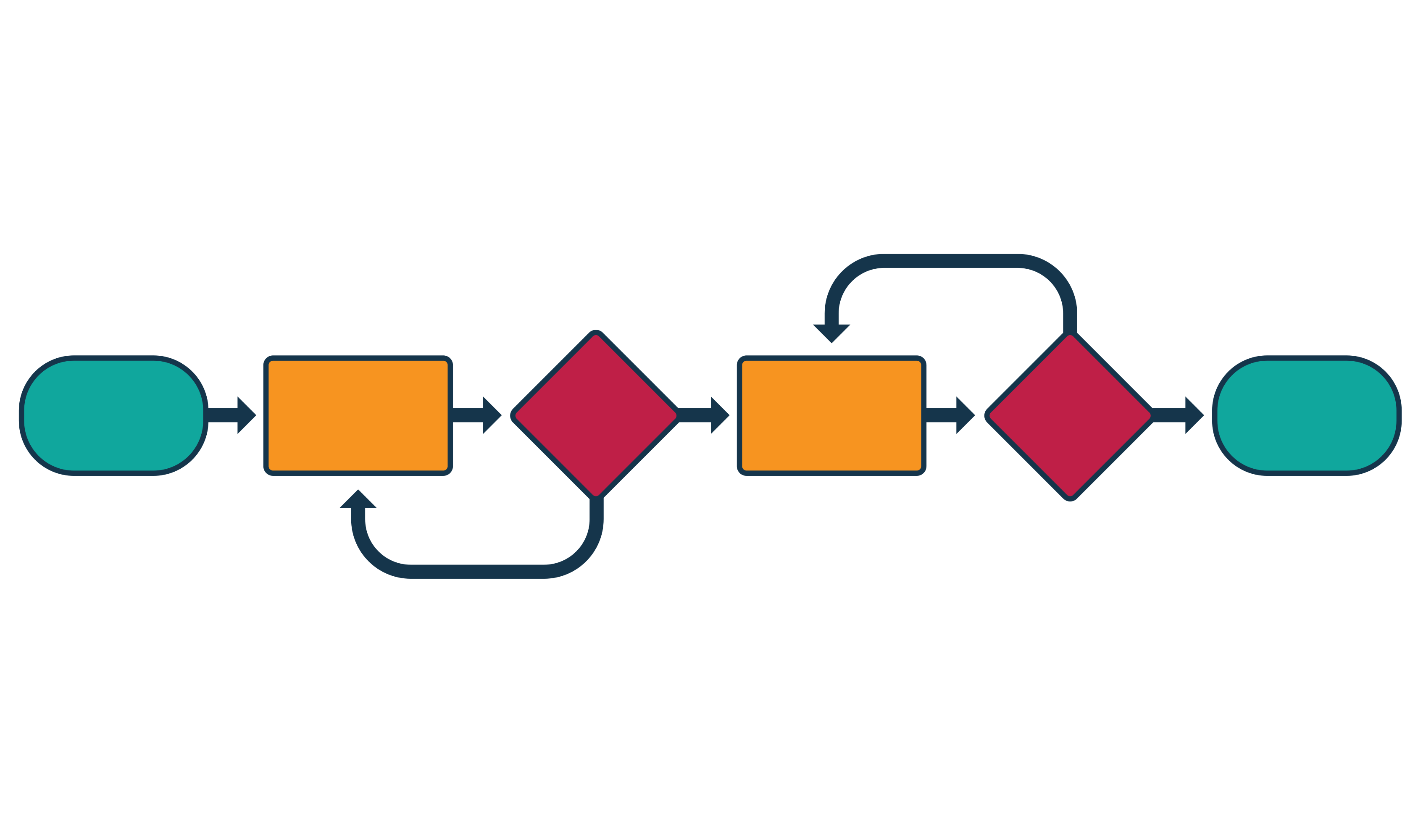
What you'll find
- Clear explanations of core algorithm ideas
- How sequencing, branching and iteration build over time
- Practical examples you can use in the classroom
- Resources to help in planning and assessment
Algorithm focus by year band:
| Year band | Students learn to |
|---|---|
| Foundation | Not included at this level in Digital Technologies |
| 1 - 2 | Follow and describe steps with simple choices and steps that repeat |
| 3 - 4 | Follow and describe steps that use data in decisions (branching) and repetition (iteration) |
| 5 - 6 | Design algorithms with decisions with multiple outcomes and repetition |
| 7 - 8 | Design algorithms with iteration and multiple and nested structures, trace errors |
| 9 - 10 | Design algorithms that use logical operators (AND/OR/NOT) and validate them. |
What are algorithms?
Algorithms are the step-by-step instructions and decisions needed to solve problems or create digital solutions.
A simpler explanation can help …
An algorithm is a set of step-by-step instructions that tell someone (or a computer) how to do something.
Why are they relevant?
Understanding algorithms helps students see how computers follow rules, make decisions and repeat actions. Algorithms are the foundation of all programming and automation.
Key terms in the curriculum
| Sequencing: | Doing things step-by-step, in order. |
|---|---|
| Branching | Making a choice or deciding what happens next. |
| Iteration | Repeating steps a number of times (in a loop) until a condition is met. |
Doing things step-by-step, in order
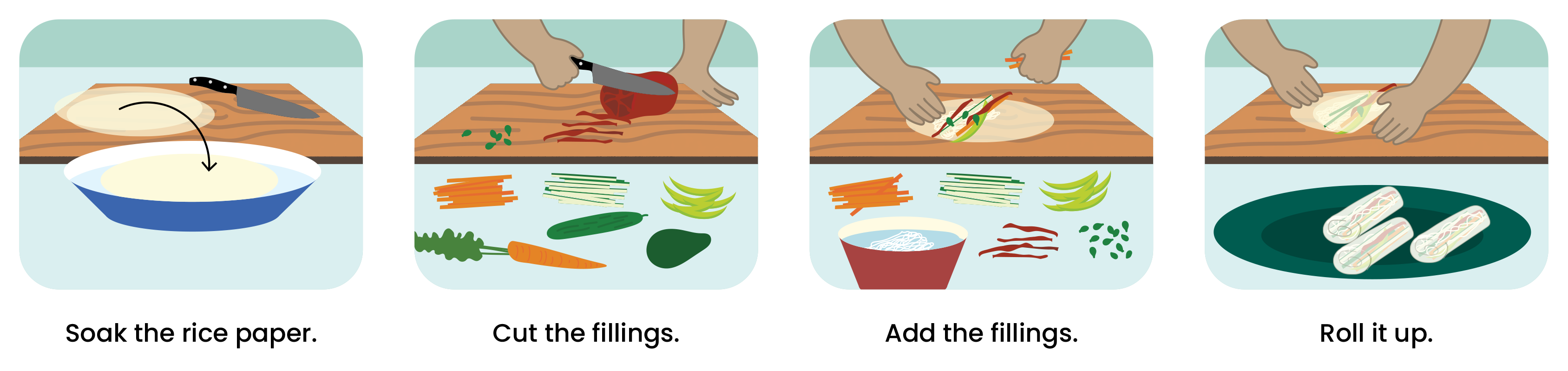
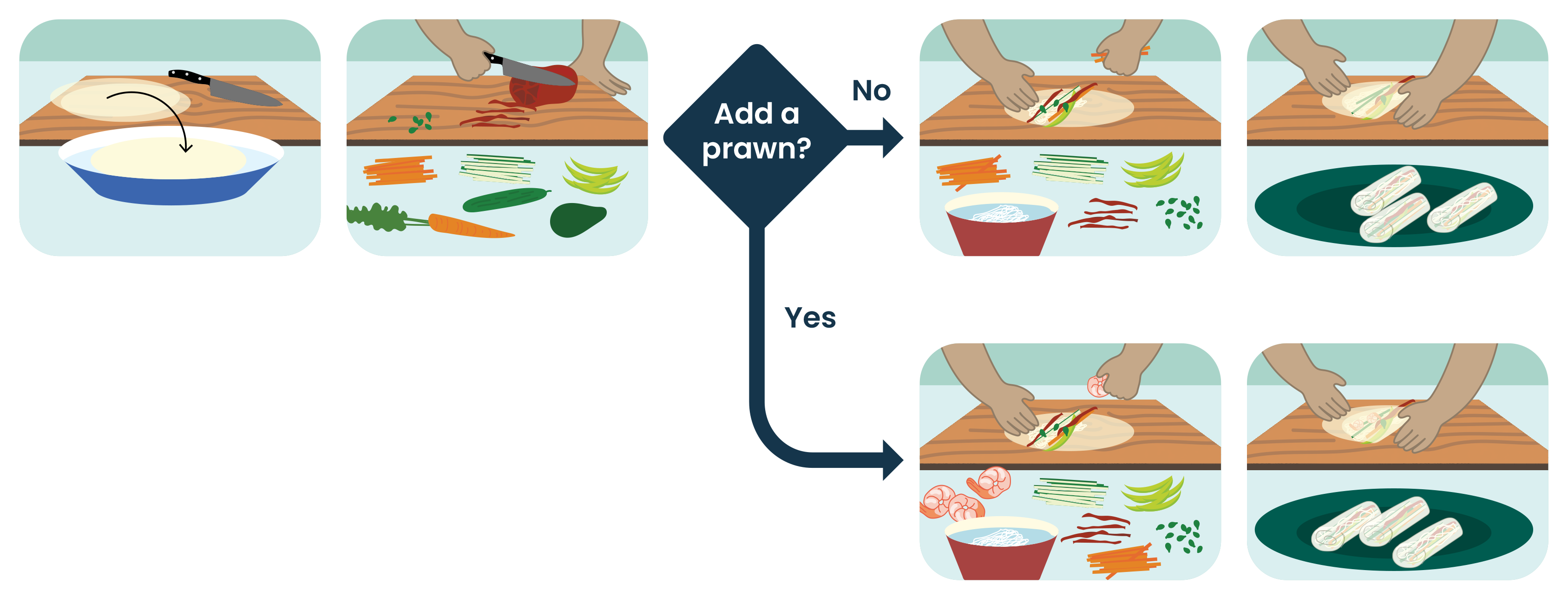
Making a choice or deciding what happens next
A decision: Do you want meat?
If yes, add a prawn.
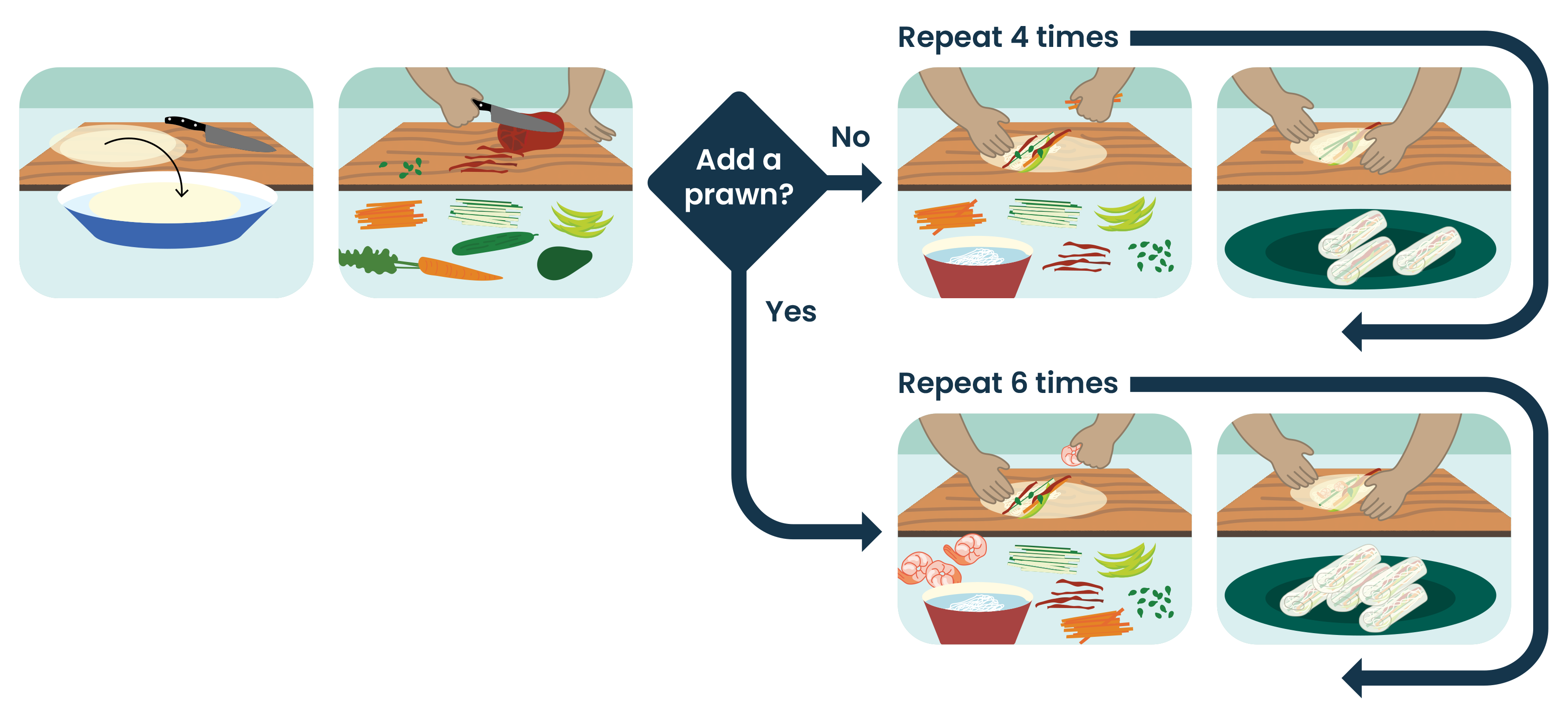
Repeating steps a number of times (in a loop) until a condition is met
A condition: You need to make 10 rice paper rolls – 4 vegetarian, 6 meat.
Representing algorithms
Algorithms can be represented in different ways to help students understand steps, decisions and iteration.
|
Spoken instructions |
Clear, step‑by‑step directions to complete a task (direct a human robot or build a LEGO model). Help students understand sequencing, decisions and iteration in an informal, hands‑on way. |
|
Role-play/enactment |
Students act out the steps of an algorithm, taking on roles such as the ‘computer’ or ‘system’. Helps students experience sequencing, decisions and iteration through physical movement and discussion. |
|
Images and text |
Visual steps supported by simple text to explain what happens at each stage of a task. Help students understand sequencing and decisions by linking written instructions with clear visual cues. |
|
Flowcharts |
Flowcharts use symbols to map out steps and decisions. The agreed use of symbols helps students read, follow and compare algorithms consistently. |
|
Pseudocode |
Pseudocode is a simple, code‑like way to write algorithms and is relevant to students in years 7–10. Pseudocode is written to be read by humans, not computers, and helps students plan and implement algorithms using a programming language such as Python. Further information: Introducrtion to Pseudocode |
Connections to computational thinking
Algorithms are a core part of computational thinking.
To explore more, refer to: What is an algorithm?
What to teach?
Algorithms are introduced early, from Year 1, and build in complexity right through to Year 10.
Here’s how the concept develops across year bands:
Algorithms in years 1–2
Expectation for this band
Students can:
- follow step-by-step instructions in the correct order
- identify when a choice changes what happens next
- repeat a set of steps when needed
- describe what happens first, next and last.
The focus is on building confidence with sequencing and noticing that choices and repetition are part of many everyday processes.
What this looks like in practice
Students follow an algorithm that includes:
- a clear sequence (first, next, then, last)
- a simple choice (if something happens, do this)
- a repeated action (keep going until finished).
The algorithm is usually spoken, acted out or supported with pictures.
Start with a simple sequence; next, add a decision; finally, introduce a repeating step. This reduces cognitive load and adds complexity in stages.
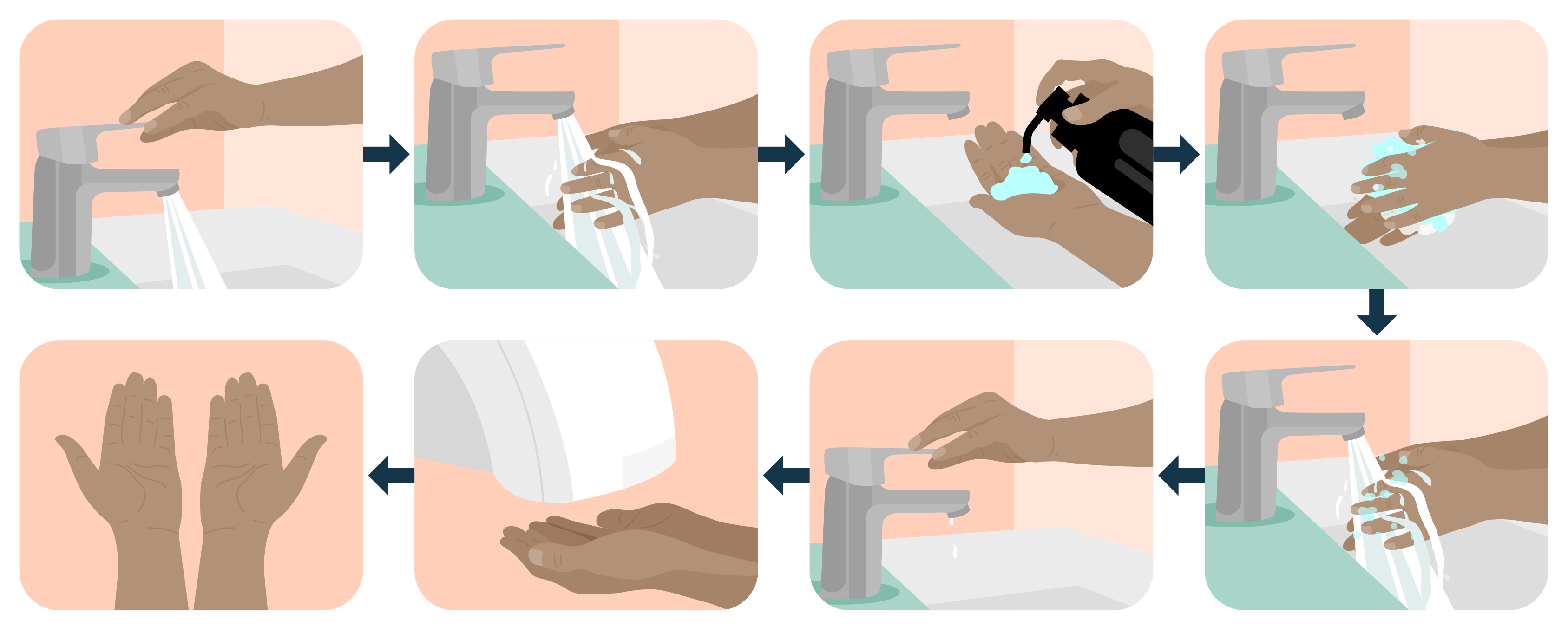
Start with a sequence of steps in order.
- Turn on the tap.
- Wet your hands.
- Add soap.
- Rub your hands.
- Rinse your hands.
- Turn off the tap.
- Dry your hands.
- Finished.
In a sequence, order is important. If a step is done out of order, the task may not be completed as intended or may not be completed correctly.
Add a simple choice.
At Step 7, introduce a decision using a question:
Is there paper towel?
Then model the response:
- If there is paper towel
👉Dry your hands with the paper towel - If there is no paper towel
👉 Shake your hands dry
This shows that a decision can change what happens next.
Finally, add a repeated action and model.
Dry your hands
👉 Keep drying until your hands are dry
This shows that some steps repeat, then stop when a condition is met.
Representation options
At this band, algorithms can be represented as:
- ✔ images with or without supporting text
- ✔ spoken and written step-by-step instructions
- ✔ role-play or physical simulation.
Evidence of learning
You might notice that students:
- follow step‑by‑step instructions in the correct order
- recognise when a choice changes what happens next and follow the correct pathway
- recognise when an action is repeated and when it should stop.
If students can explain why a decision occurred, they are developing algorithmic reasoning.
Common misconceptions or errors to watch for
- Doing steps out of order
- Missing a step
- Following the wrong pathway after a decision
- Not repeating an action or not knowing when to stop.
Address these explicitly during modelling and discussion.
Algorithms in Years 3 - 4
Expectation for this band
Students can:
- Follow step-by-step algorithms
- Use real data (numbers, money, temperature) to make decisions using data comparisons (<,> , =)
- Repeat steps until a stopping condition is met
- Explain why a particular pathway was chosen
In years 3–4, the focus shifts from sequencing everyday routines, as students do in years 1–2, to exploring data-driven decision-making.
What this looks like in practice
Students follow an algorithm that includes:
- A sequence of steps
- A decision point based on comparing numbers
- A repeated process until a target is reached.
The algorithm may be spoken, written, represented as a simple flowchart, or enacted physically.
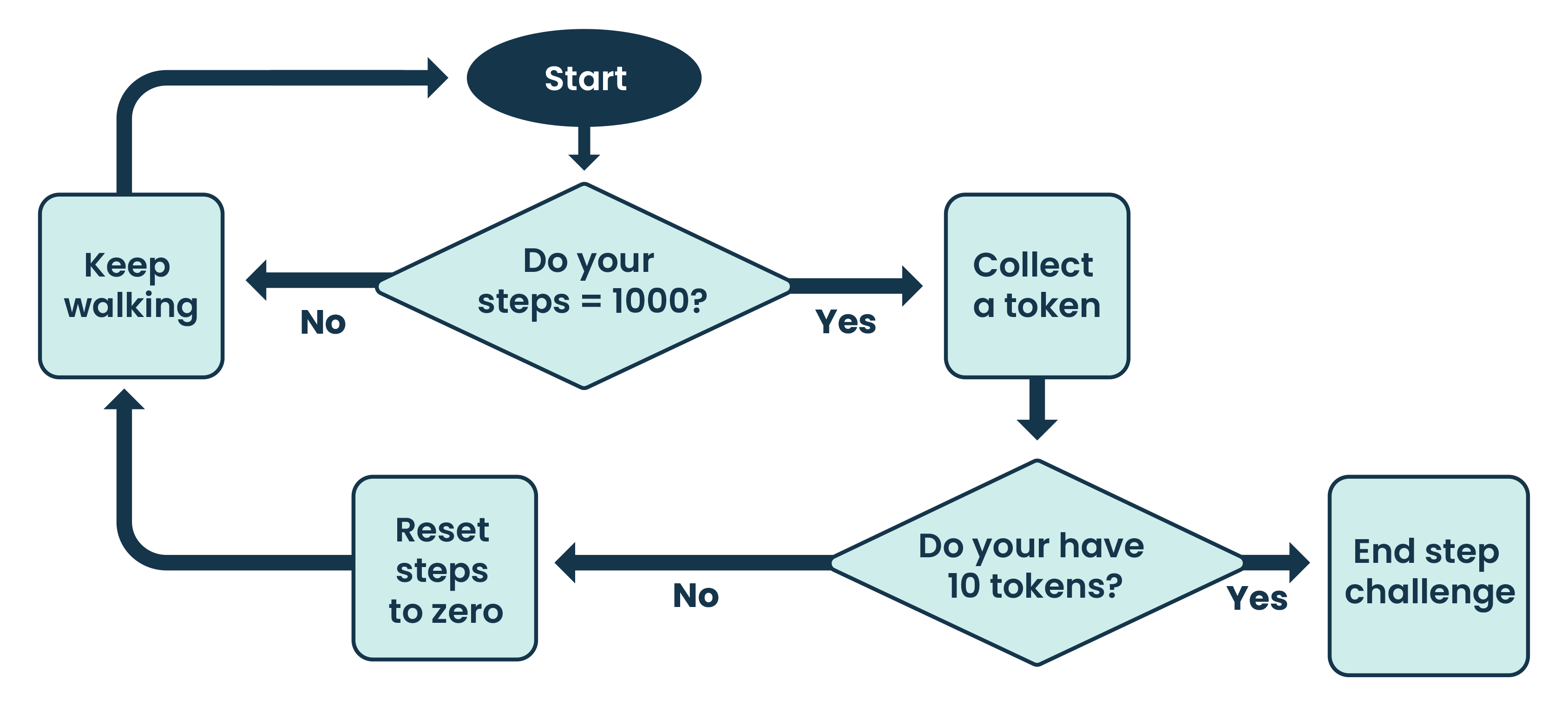
Goal: Reach 10,000 steps by collecting 10 tokens.
- Start with 0 tokens.
- Record the number of steps walked.
- If steps < 1,000 → keep walking.
- If steps = 1,000:
- Collect 1 token.
- Reset the step count to 0.
- Repeat until you have 10 tokens.
- Stop.
Students
- Compare step totals using ≥ or =
- Decide whether a token is awarded
- Repeat the process until the stopping condition is met
Extension: Ask students to predict outcomes before running the algorithm.
Representing Algorithms
At this band, algorithms can be represented as:
- ✓ Written step-by-step instructions
- ✓ Simple flowcharts with decision diamonds
- ✓ Role-play or physical simulation
- ✓ Structured "IF... THEN..." statements
Flowcharts begin to become useful here but should remain simple.
Evidence of learning
You might notice that students:
- Correctly compare numbers using <, >, =
- Follow the correct decision pathway
- Explain why a particular branch was taken
- Recognise when repetition should stop
- Predict what will happen for a given input
If students can explain why a decision occurred, they are developing algorithmic reasoning.
Common misconceptions or errors to watch for
- Confusing the comparison symbol (< vs >)
- Forgetting to update values during repetition
- Continuing a loop without checking the stopping condition
- Describing steps without linking them to data.
Address these explicitly during modelling.
Algorithms in Years 5 - 6
Expectation for this band
Students can:
- design their own algorithms rather than only following given ones
- use formal decision‑making language (IF, THEN and ELSE) to show multiple possible pathways
- design algorithms that include branching and repetition
- identify and use a clear stopping condition
- explain how changing a decision affects the outcome of an algorithm.
The focus shifts from data-driven decision-making, as explored in years 3–4, to designing, testing and refining algorithms with multiple pathways and repeated actions.
What this looks like in practice
Students follow an algorithm that includes:
- a clear sequence of steps
- one or more decision points with multiple possible outcomes
- a repeated process with an agreed stopping condition.
The algorithm may be written as step-by-step instructions, represented as a flowchart, or enacted through role-play. The emphasis is on clarity, logic and accuracy.
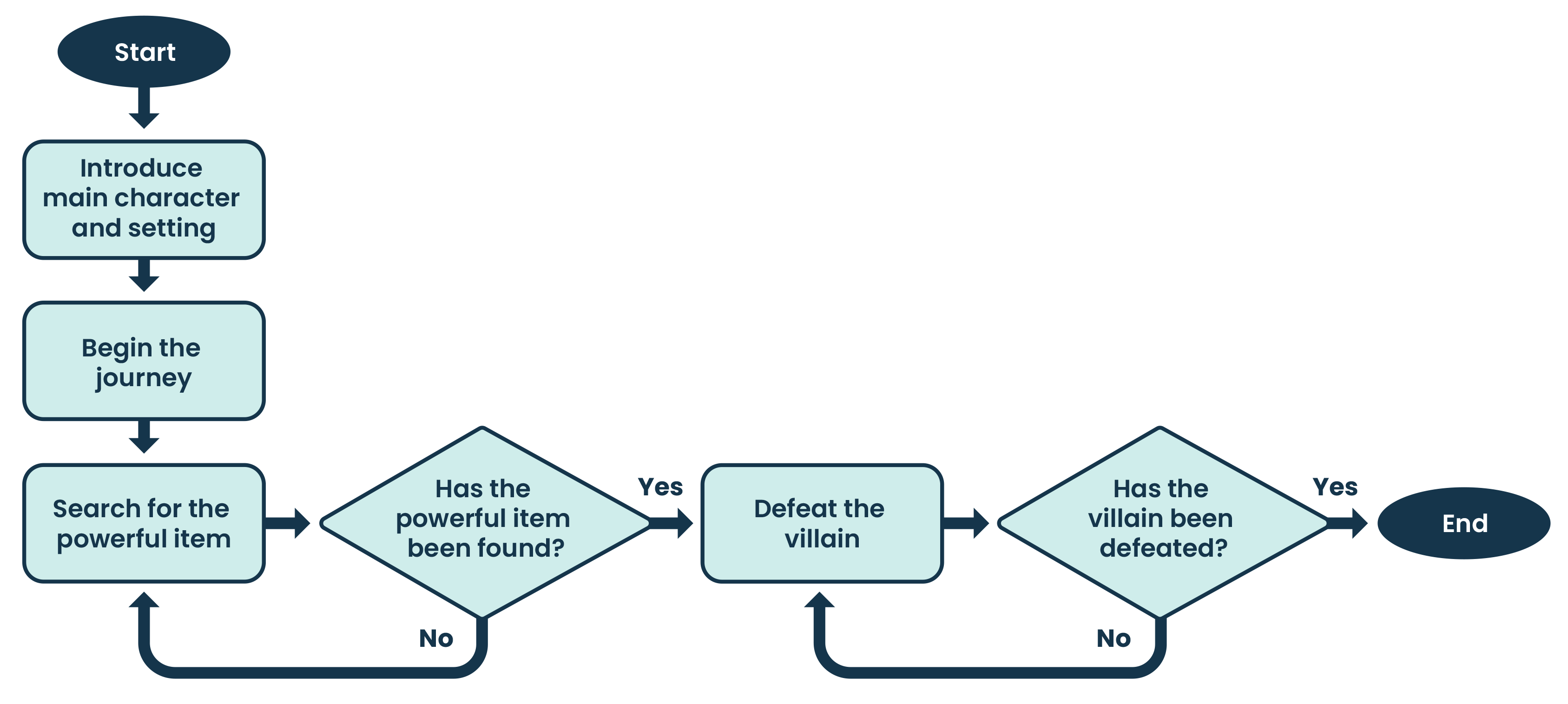
Students begin with a linear storyline to establish the context and problem.
Once the sequence is clear, decision points are introduced. Finally, iteration is included.
Start with a sequence of steps in order. The character is introduced and the scene is set.
- The conflict is introduced.
- The character faces a challenge.
- The conflict is resolved.
- The character reaches resolution and the story ends.
This linear sequence establishes the context and problem before any decisions are introduced.
Introduce multiple decisions.
- The character is introduced and the scene is set.
- The conflict is introduced.
- The character faces a challenge and a decision.
- IF the quest is to be undertaken
- THEN follow the cave pathway.
- IF a guide is needed
- THEN go back to Step 1, and choose the guide.
- ELSE Stay on the path.
- The conflict is resolved.
- The character reaches resolution and the story ends.
This example shows that an algorithm can include multiple decisions and may return to earlier steps before reaching an end.
Introduce repetition.
At Step 3, the character faces a challenge and a decision.
IF the quest is to be undertaken
THEN follow the cave pathway.
Along the cave pathway, the character searches for a powerful item.
Repeat the search until the powerful item is found.
Once the item is found, the story continues.
Representation Algorithms
At this band, algorithms can be represented as:
- ✔ written step-by-step instructions
- ✔ flowcharts using standard symbols to show multiple pathways and loops
- ✔ role-play or physical simulation
- ✔ structured "IF-THEN-ELSE" statements.
Flowcharts and structured decision language are used more deliberately at this stage to support design, testing, and refinement of algorithms.
Evidence of learning
You might notice that students:
- design algorithms that include multiple decisions
- use IF-THEN-ELSE language accurately to represent alternative pathways
- correctly follow the different pathways based on decisions made
- apply repetition and clearly identify when a repeated process should stop
- explain how changing a decision or condition changes the outcome of an algorithm.
If students can explain how decisions and repetition control what happens next, they are demonstrating strong algorithmic reasoning.
Common misconceptions or errors to watch for
- Decision points are lacking or are incomplete
- Confusing IF, THEN and ELSE
- Not setting a clear stopping condition
- Creating algorithms that work for some choices but not all.
Address these explicitly during modelling, testing and refinement.
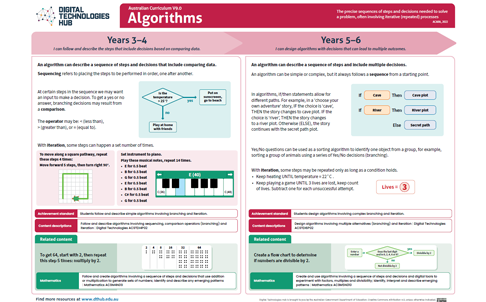
Algorithms in years 7–8
Expectation for this band
Students can:
- design algorithms that include multiple and nested decisions
- represent algorithms using flowcharts or pseudocode following agreed conventions
- trace algorithms manually to predict outputs for given inputs
- identify and explain errors or unexpected behaviour in algorithms.
The focus shifts from designing branching algorithms, as students do in years 5–6, to understanding and controlling algorithm complexity through nested decisions, tracing and clear representation.
Nested decisions occur when an algorithm makes a decision and, within one of the outcomes, makes another decision.
Key terms in the curriculum
| Nesting | Combining choices inside other choices. |
|---|---|
| Tracing | Formally tracking an algorithm line by line, often writing a trace table. |
What this looks like in practice
Students design algorithms that require:
- multiple decisions, including nested decisions and repetition
- representation using flowcharts or pseudocode
- use of standard conventions; for example, IF–THEN–ELSE structures and loop statements.
Students then trace algorithms step‑by‑step using given inputs to predict outputs, track how values change, and identify errors or unexpected behaviour.
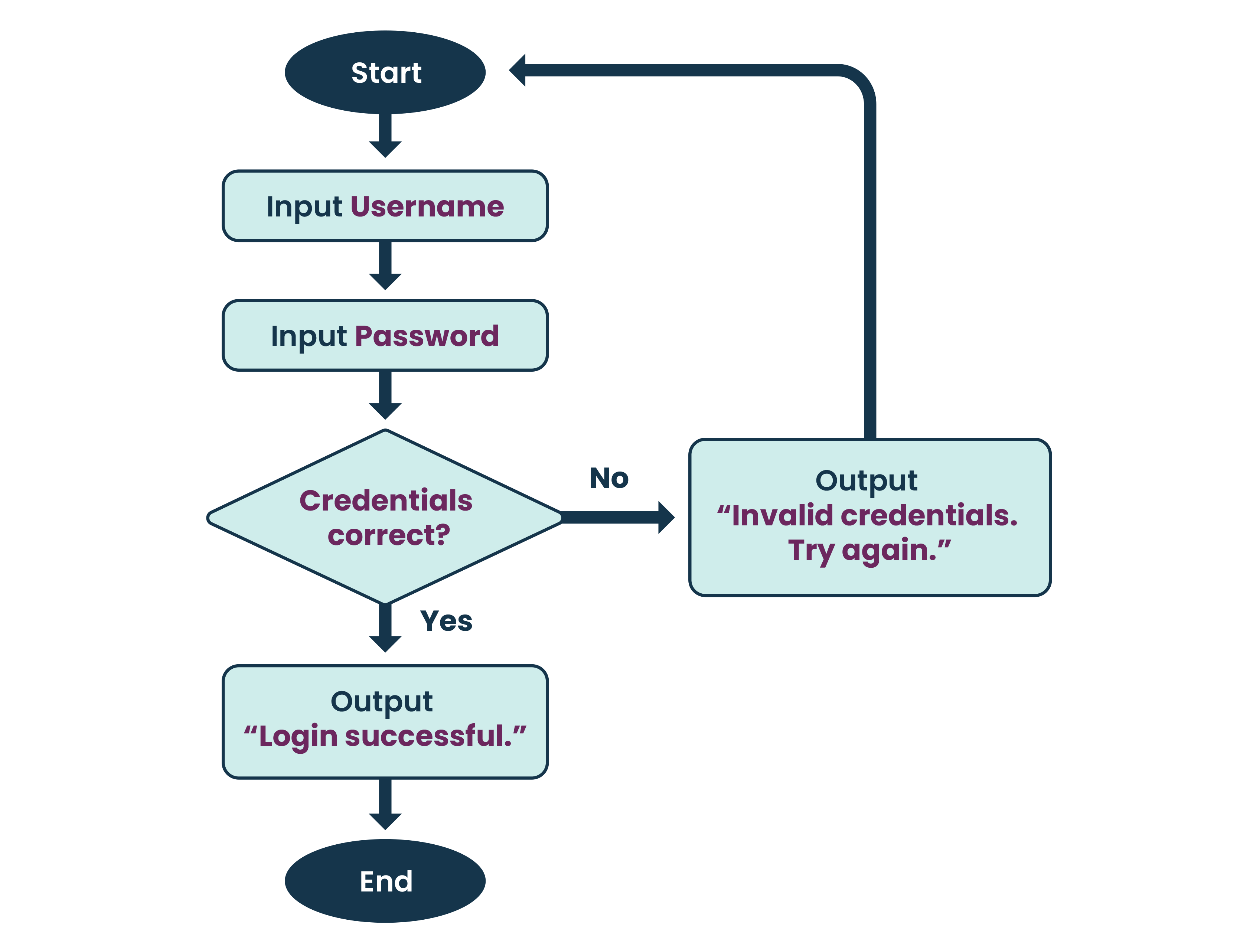
Start with a simple flowchart that represents the algorithm.
Introduce multi-factor authentication: nested decisions represented as pseudocode.
START
IF the password is correct THEN
Check whether the verification code is correct
IF the code is correct THEN
Access is granted
ELSE
Access is denied
END IF
ELSE
Access is denied
END IF
END
This example shows how a decision can occur within another decision, creating a nested control structure.
Representation options
At this band, algorithms can be represented as:
- ✔ flowcharts or pseudocode following agreed conventions
- ✔ structured IF-THEN-ELSE statements to represent nested decisions.
Flowcharts and pseudocode are used deliberately to support tracing, precision and debugging.
Evidence of learning
You might notice that students:
- design algorithms that include multiple and nested decisions
- represent algorithms clearly using flowcharts or pseudocode following agreed conventions
- trace algorithms step‑by‑step to predict outputs for given inputs
- track how values or states change as an algorithm executes
- identify and explain errors or unexpected behaviour in algorithms.
If students can trace an algorithm and explain why it behaves as it does, they are demonstrating strong algorithmic reasoning.
Common misconceptions or errors to watch for
- Creating algorithms that work for some inputs or conditions but not all
- Incorrectly nesting decisions or placing decisions in the wrong order
- Skipping steps or losing track of the pathway when tracing an algorithm
- Misinterpreting the meaning of flowchart symbols or pseudocode structures
- Failing to trace all possible pathways before assuming an algorithm works
- Losing track of values or states as they change during execution.
Address these explicitly through modelling, tracing activities and debugging tasks.
Algorithms in Years 9 - 10
Expectation for this band
Students can:
- design algorithms with complex and formalised conditions to control decisions and looping
- use logical operators (AND, OR and NOT) to combine conditions
- validate algorithms by testing them with intentionally selected inputs (including boundary values)
- refine algorithms when outputs do not match expectations.
In this band, students move from tracing and debugging nested structures, as they do in years 7–8, to designing algorithms that require more complex conditional logic and systematic validation.
Key terms in the curriculum
| Logical operators (AND, OR and NOT) | Symbols or words used when a condition is more complex than a simple comparison. |
|---|---|
| AND | An operator meaning both conditions must be true. For example, ‘Advance only if score is high AND time remains.’ |
| OR | An operator meaning at least one condition must be true. For example, ‘Continue if lives remain OR a checkpoint has been reached.’ |
| NOT | An operator that reverses a condition. For example, ‘Reject if input is NOT valid.’ |
| Validation | Testing an algorithm using intentionally selected input data, rather than only trying one or two examples. |
What this looks like in practice
Students design algorithms that require:
- combined conditions using AND, OR and NOT
- decisions and loops controlled by formalised logic
- representation using flowcharts or pseudocode with precise conditions
- validation using a planned set of test cases (including boundary values).
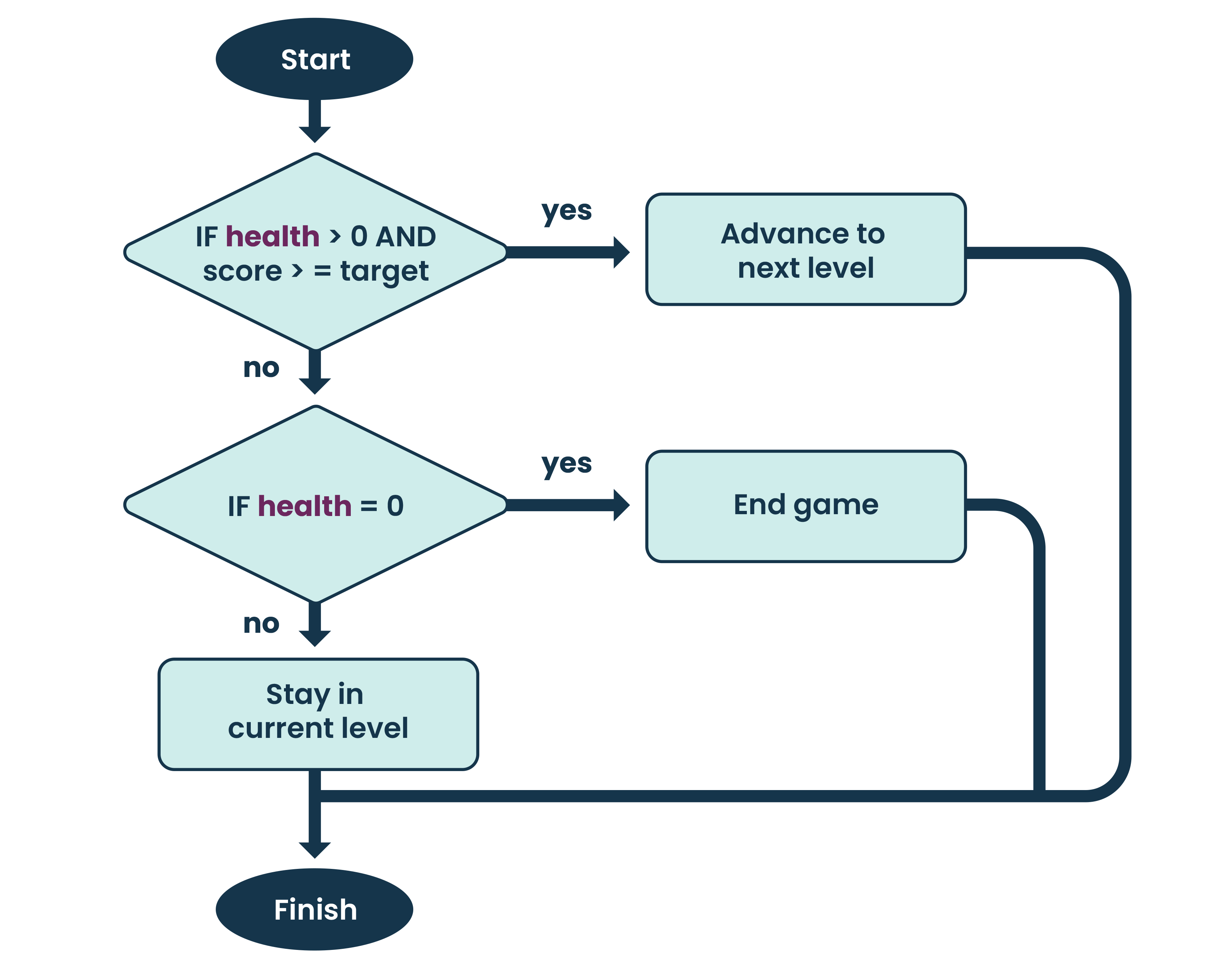
Students design a game rule where a player advances only when a combined condition is met.
START
IF health > 0 AND score ≥ target THEN
Advance to next level.
ELSE
IF health = 0 THEN
End game.
ELSE
Stay in the current level.
END IF
END IF
END
Students explain how changing one part of the condition affects the outcome:
If the score is high but health is 0, does the player advance?
(Note that AND means both have to be true.)
Validating the algorithm
Students validate the algorithm by selecting test inputs on purpose (not randomly), including boundary values.
For example, students test combinations such as:
|
Health |
Score (target is 10) |
Expected Output |
|
2 |
11 |
Advance level |
|
1 |
10 |
Advance level |
|
1 |
9 |
Stay in current level |
|
0 |
10 |
End game |
|
0 |
9 |
End game |
Students compare expected outcomes to actual outcomes and refine the algorithm if needed.
Representing Algorithms
At this band, algorithms can be represented as:
- ✔ flowcharts or pseudocode following agreed conventions and clearly showing use of logical operators
- ✔ structured IF-THEN-ELSE statements to represent nested decisions, using logical operators AND, OR and NOT.
Flowcharts and pseudocode are used deliberately to support tracing, precision, finding errors and validation.
Evidence of learning
You might notice that students:
- design algorithms that use complex and combined conditions with logical operators (AND, OR and NOT)
- represent algorithms clearly using flowcharts or pseudocode that follow agreed conventions
- trace algorithms step‑by‑step to track how values or states change as an algorithm runs
- validate algorithms by testing typical, extreme and boundary values
- identify errors or limitations and refine algorithms when outputs do not match expectations.
If students can justify their test cases and explain why an algorithm works correctly across all relevant cases, they are demonstrating strong algorithmic reasoning.
Common misconceptions or errors to watch for
- Misuse of logical operators AND, OR and NOT
- Creating algorithms that work for some inputs or conditions but not all
- Incorrectly nesting decisions or placing decisions in the wrong order
- Skipping steps or losing track of the pathway when tracing an algorithm
- Misinterpreting the meaning of flowchart symbols or pseudocode structures
- Testing algorithms with a few convenient examples and assuming they work, rather than validating them using representative inputs such as minimum, maximum and boundary values
- Losing track of values or states as they change during execution.
Address these explicitly through modelling, tracing activities, finding errors and validation using test cases.
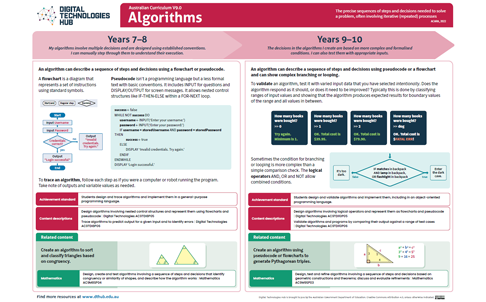
Poster: Key ideas, practical examples, Australian Curriculum
Download Algorithms poster (7-10) [PDF]
Plan your teaching
Explore sample units and lessons.
These sample units show how algorithms can be taught as a short sequence or extended unit at each year level.
Years 1–2: Solving simple problems
Years 3–4: Introduction to programming
Years 5–6: Programming challenges
Years 7–8: General-purpose programming
Years 9–10: Programming
Use this planning template to record relevant information as you view a scope and sequence topic for your year level.
Research-informed teaching
Evidence-based approaches
- Unplugged learning (familiar routines and examples)
- Semantic waves (concrete to abstract learning)
- Dual coding (visual and verbal)
- Worked examples with gradually reduced scaffolding
- Culturally responsive pedagogies
Unplugged learning
Research from CS Unplugged shows that introducing computing concepts without devices helps students focus on core ideas before adding technical complexity.
What this looks like in practice
- Begin with an activity that does not require a digital device.
- Use familiar materials, movement or role play to model how a system works; for example, instructing a human robot or simulating a multi factor authentication process.
- Focus discussion on the sequence of steps, decision points and rules that control the system.
- Introduce digital tools later, once students understand the underlying process.
Example
Students role-play a secure access system. One student acts as the system, while another acts as the user. Access is granted only after completing a sequence of checks, such as providing a correct password and completing a second verification step. Students identify where decisions are made, what happens when a check fails, and when the process repeats, before later exploring how similar systems are implemented digitally.
Semantic waves
Research from the National Centre for Computing Education shows that students understand abstract ideas more deeply when teachers deliberately move between everyday examples and formal terminology.
What this looks like in practice
- Start with a real-life example; for example, making a sandwich or rice-paper roll.
- Ask students to describe the steps in everyday language.
- Name the computing concept, for example sequencing, branching or iteration.
- Revisit the example and name the concept explicitly.
Example
When you decide whether to add vegetables or meat to your rice-paper roll, you are making a choice. In algorithms, this is called branching – an IF-THEN decision.
Learn more about semantic waves (opens external website in a new window) [PDF]
Dual coding
Research synthesised by Richard E Mayer shows that students learn new concepts more effectively when information is presented using both words and visuals, reducing cognitive load and supporting deeper understanding.
What this looks like in practice
- Present new concepts using both spoken or written explanations and visual representations.
- Use diagrams, images, symbols or simple models alongside verbal descriptions.
- Explicitly link the visual elements to the language being used.
- Revisit the concept using both modes together to reinforce understanding.
Example
When introducing algorithms, a teacher explains the steps of a process while displaying a simple flowchart. As students hear terms such as sequence or decision, they see these ideas represented visually using arrows and decision shapes. Students refer to both the explanation and the diagram when describing how the algorithm works.
Worked examples with gradually reduced scaffolding
Research synthesised by the Australian Education Research Organisation shows that modelling worked examples and gradually reducing support improves learning of complex procedures.
What this looks like in practice
- Model a complete example before asking students to work independently.
- Make the thinking process explicit by explaining decisions and steps as they occur.
- Provide structured support such as prompts, templates or partially completed examples.
- Gradually remove scaffolds as students gain confidence and competence.
Example
A teacher works through an algorithm step‑by‑step with the class, showing how each decision affects what happens next. Initially, students follow a completed example. Next, they complete a partially worked algorithm with guidance. Finally, students design and test their own algorithms independently, applying the same process without prompts.
Culturally responsive pedagogies
Culturally responsive pedagogies recognise and value students’ cultural identities, experiences and ways of knowing, and use these as a foundation for learning.
What this looks like in practice
- Broaden learning contexts beyond common classroom examples by drawing on culturally diverse games, stories and real‑world systems, and on texts created by authors from different cultural backgrounds.
- Select examples that reflect the different cultural backgrounds, experiences and communities represented in your classroom.
- Where possible, co-design activities with local communities or source learning materials created by First Nations authors and knowledge holders.
- Ensure cultural examples are used respectfully and purposefully to support learning.
Example
Students learn about algorithms through a traditional game or story shared by an Aboriginal or Torres Strait Islander author. The class focuses on identifying patterns, rules and decision points within the activity, connecting these ideas to algorithmic concepts such as sequencing and branching, while acknowledging the cultural origins and significance of the example.
Check understanding
- 1–2: Checklist
- 3–4: Assessment advice
- 5–6: Work sample
- 7-8: Rubric
- 9–10: Work sample
Teachers can assess student learning in a range of ways, including through checklists, observations, rubrics and student work samples.
- Years 1–2: Fairytale fun assessment. Teachers assess the student’s retelling of a story using the slide sorter function to order a set of slides. This resource includes a checklist for recording the student’s demonstrated skills and knowledge.
- Years 3–4: Bee Bot Balloon Pop. During this activity, students consider the functions of the Bee Bot and how a user can interact with this device. The assessment section provides advice on assessing students’ knowledge of algorithms.
- Years 5–6: Fashion game. (opens external website in a new window) This resource includes a work sample of a digital solution with annotations about the student’s explanation of algorithms.
- Years 7–8: Rock, Paper, Scissors AI! The assessment section of this lesson provides advice on assessing students’ knowledge of algorithms and includes a rubric.
- Years 9–10:
- Digital project: Python game development (opens external website in a new window). This resource includes a work sample of a digital solution with annotations about how well the student has designed and validated algorithms.
- Data compression. Use this resource to assess students’ knowledge of how pixel information can be manipulated by reducing file size and of the trade-offs between pixel counts and image quality.
Deepen your understanding
Explore these resources for further background to help teach about algorithms:
- Field guide: Algorithms (opens external website in a new window) (CS Unplugged): covers algorithm fundamentals, searching and sorting
- What’s an algorithm? (opens external website in a new window) (David J Malan): a practical example of pseudocode
- Intro to algorithms (opens external website in a new window): Crash Course Computer Science #13: explores algorithm efficiency and sorting algorithms
- Exploring Digital Technologies: Practical ideas, planning tools and next steps Webinar with a significant section on algorithms for Years 1-6
Supporting resources
- Download posters by year band: [F–2] [3–6] [7–10]
- Download full F–10 pack of posters
- DT Unit Planning Template (6–8 weeks) MS Word
![[F–2]](/media/quth2usk/algorithms-f-2.png)
![[7–10]](/media/jpgb503v/algorithms-7-10.png)