Artificial intelligence
This resource helps Digital Technologies teachers make sure their teaching of artificial intelligence (AI) is aligned with the Australian Curriculum from Foundation to Year 10.
What you'll find
- Clear explanations of how AI systems use data, patterns and predictions
- Support for teaching students to use, question and, where appropriate, evaluate AI systems across year levels
- Practical examples classroom activities
- Resources to help in planning and assessment
Teaching with and about artificial intelligence
AI is embedded in the Australian Curriculum, appearing as elaborations in relevant content descriptions.
It can be used as an authentic context for teaching core Digital Technologies concepts, including data representation, algorithms, digital systems and evaluating.
Teaching and learning about AI can be organised into three interrelated areas:
- understanding how AI works
- recognising different types of AI
- using and applying AI responsibly.
This gives students opportunities to learn how AI works by exploring how systems use data, identify patterns and produce predictions or outputs, including with machine learning. It also helps students understand different types of AI, including image and speech recognition, recommender systems and generative AI (also known as GenAI).
Students can explore the responsible use and application of AI by examining where and how AI is used in everyday life, and by asking critical questions about accuracy, bias, fairness and the impact of AI-generated outcomes.
What is artificial intelligence?
AI refers to computer systems that use data and processes to identify patterns and generate outputs such as predictions, recommendations or decisions. These systems can perform tasks that appear like human abilities, such as recognising images, understanding language and solving problems.
A simpler explanation can help …
AI is when computers use data to find patterns and make predictions or suggestions, rather than just following fixed step-by-step instructions.
Generative AI is a type of AI that uses data to create new content, such as text, images, audio or video. Because it generates outputs based on patterns in data, the results may not always be accurate or relevant.
A way to look at AI is a process: data → patterns → prediction → output
- Data: what the system uses
- Patterns: what it finds
- Prediction: what it judges as most likely
- Output: what the user sees
AI systems use data to identify patterns and then generate outputs based on those patterns. Generative AI uses the same process but repeatedly applies prediction to produce new content.
Why AI is relevant?
AI is increasingly embedded in everyday digital systems that make predictions, recommendations and decisions. This creates opportunities for learning, but also raises important questions about accuracy, bias and impact.
Generative AI is especially relevant in education because it is already being used by teachers and students to support learning, generate ideas and create content.
Key terms in the curriculum
| Data | Information (such as images, text or numbers) that AI systems use |
|---|---|
| Patterns | Similarities or relationships in data that AI systems identify and use |
| Prediction | A result generated by an AI system based on patterns in data, such as a guess, classification or recommendation |
| Input | The data an AI system collects or receives so it can work to produce an output |
| Machine learning | A type of AI where systems learn patterns from data to improve how they make predictions or decisions |
| Output | The result produced by an AI system |
| Bias | When an AI system produces unfair or misleading results because of patterns in the data it was trained on, such as stereotypes or missing information |
| Generative AI/GenAI | A type of AI that uses patterns in data to generate new content |
| Data | An AI system that recognises pest species in a national park needs to be trained on many images of feral cats, wild pigs and foxes, as well as native species it is likely to detect through trail camera images. |
|---|---|
| Patterns | A music recommendation system identifies patterns in what people listen to, such as songs often played together, favourite genres or artists most listened to. It uses these patterns to recommend new music. |
| Prediction | A voice assistant or chatbot predicts the most likely word or response based on the words a person has already said or typed. |
| Input |
|
| Machine learning | An AI-based email filter uses machine learning to learn patterns in messages labelled as spam or not spam and improves over time how it identifies unwanted messages. |
| Output | When a chatbot generates an answer to a question, that answer is the output. |
| Bias | An AI photo sorter puts pictures of females into the ‘nurse’ folder and males into the ‘doctor’ folder because the training data mostly showed nurses as women and doctors as men. |
| Generative AI/GenAI | A chatbot such as ChatGPT or Copilot that writes text from a prompt. |
Connections to general capabilities
AI provides a useful context for developing general capabilities in the Australian Curriculum. While AI can support the development of several capabilities, the following three have strong connections to this learning.
Ethical Understanding: AI provides opportunities for students to consider fairness, bias, responsibility and the impact of digital systems on people and communities. It can also support discussions about appropriate use and the reliability of AI-generated content.
Critical and Creative Thinking: AI helps students ask questions, identify patterns, test ideas and evaluate results. Generative AI can also be used to generate ideas and explore alternative approaches, while students are encouraged to critically review and improve outputs.
Digital Literacy: AI supports students to use and evaluate digital technologies purposefully. Students learn to interpret AI-generated outputs, understand limitations, manage risks and use digital tools safely, critically and responsibly.
What to teach?
AI provides an authentic context that can begin in simple forms at Foundation and grow in complexity through to Year 10.
Here’s how the concept can be developed across year bands:
Artificial intelligence in Foundation
Expectation for this band
When AI is used as a context for learning, students can:
- notice and describe simple visual features (shapes, lines, colours) that help AI recognise familiar icons such as weather symbols
- experiment with drawing familiar icons and observe what an AI tool predicts they might be
- compare their own thinking with the AI’s prediction and discuss which features may have influenced the result.
A focus on AI can be introduced in Foundation by linking representing data with pattern recognition, for example, by exploring what makes weather icons recognisable and then using a simple AI drawing tool to see how it predicts student-drawn icons.
What this looks like in practice
Students explore simple ideas about AI when they:
- notice important visual features in familiar symbols such as weather icons and emojis, and discuss which details help both people and AI tools recognise what the symbol represents
- draw familiar icons and compare their drawings with an AI tool’s predictions, talking about why AI might have guessed a particular icon and which features it used
- sort and group icons or drawings based on shared features – for example, ‘icons with circles’, ‘icons with lines’ or ‘icons that show weather’ – and make simple generalisations about how AI uses patterns to recognise images
- compare two similar images, such as a bee and a fly, and discuss which features help AI to tell them apart (for example, stripes, wings or body shape), noticing that AI looks for patterns just like people do.
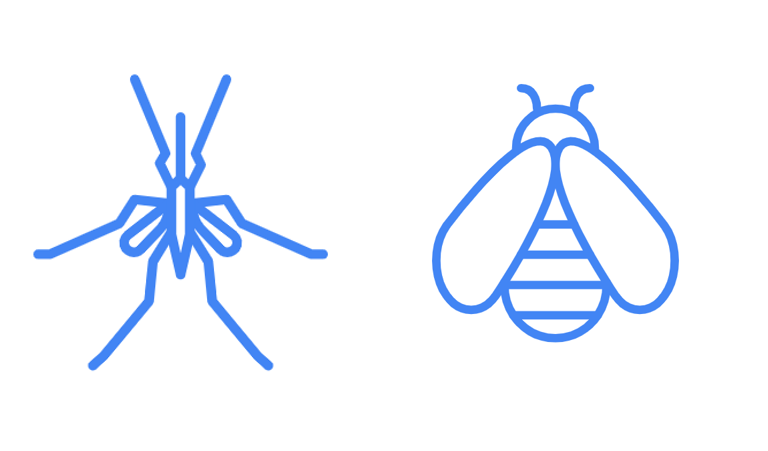
Image credit: AutoDraw
By the end of this activity, students can describe the important features in familiar icons, compare their drawings with an AI tool’s predictions, and explain how both people and AI use patterns to recognise images.
Retrieval: Show familiar weather icons and emojis. Ask: ‘What do you think this picture means?’ ‘How can you tell?’
Notice important features: Focus on a few icons (sun, rain, storm). Students describe the key features that make each icon recognisable (shapes, lines, colours).
Draw and predict with an AI tool: Students draw a chosen weather icon using a simple online drawing tool such as AutoDraw (opens external website in a new window) . Use an AI tool to see what it ‘thinks’ the drawing is. Briefly discuss: ‘Why do you think AI guessed that?’
Compare similar images: Show images of a bee and a fly and ask students to spot small differences (stripes, wings, body shape). Explain that these are the kinds of details AI looks at to tell things apart. Students explore other similar items (for example, a car and a truck, a penguin and a seagull, or a wombat and a koala).
Exit ticket: Students respond verbally or on a mini whiteboard to one or two prompts:
1. What is one difference between a bee and a fly that could help AI tell them apart?
2. Did you trick AI today? Answer ‘yes’ or ‘no’ and explain why you think that happened.
Evidence of learning
You might notice that students:
- identify key visual features in familiar icons (such as weather symbols or emojis) and use these features to make their own simple, recognisable drawings
- compare their drawings with an AI tool’s predictions, explaining which features helped AI guess what they were drawing
- spot similarities and differences between closely related images and describe which small details help AI tell them apart
- make simple statements about how AI recognises patterns, such as ‘It saw the circle and lines so it thought it was the sun’.
Students are developing an understanding of how AI uses patterns when they notice important features, compare their drawings with AI predictions and explain how small details help AI recognise images.
Common misconceptions or errors to watch for
- Thinking AI is ‘magic’ rather than understanding that it looks for patterns and features
- Changing features each time they draw an icon, making it harder for AI (and others) to recognise patterns
- Focusing on unnecessary or decorative details instead of the key features that define the icon
- Assuming AI is always correct, rather than noticing when its prediction doesn’t match their intention.
Address these explicitly during modelling and discussion.
Artificial intelligence embedded in Foundation Digital Technologies
These examples illustrate the connection between content descriptions and the teaching activities in this guide.
| Using Autodraw |
|---|
Relevant ACARA content descriptions
Example in practice
|
Artificial intelligence in Years 1-2
Expectation for this band
When AI is used as a context for learning, students can:
- notice and describe the important features that make familiar objects recognisable in drawings
- use a simple AI drawing tool to compare their own drawings with the AI guesses
- identify patterns in drawings and explain how these patterns help AI make a prediction
- compare similar drawings or objects and discuss which details help AI tell them apart
- recognise that AI makes guesses based on patterns from many examples and does not always get it right.
The focus is on explaining how AI uses patterns from many examples to predict what a drawing might be.
What this looks like in practice
Students explore ideas about AI when they:
- use a simple AI drawing tool to compare their own drawings with the AI guesses, noticing when the tool predicts correctly and when it does not
- identify patterns in drawings and explain how these patterns help AI make a prediction about what the drawing might be
- compare similar drawings or objects and discuss which details (such as shape, parts or outline) help AI tell them apart
- recognise that AI makes guesses based on patterns from many examples and that its predictions are not always correct.
Connecting data representation in the context of AI helps students understand how pictures can represent objects and ideas and how AI uses patterns in many examples to make predictions.
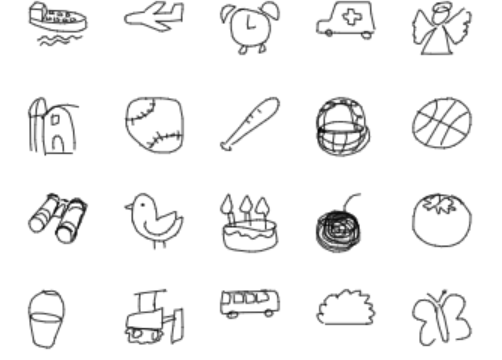
Image credit: Quick, Draw! The data
By the end of this activity, students can describe the features that make an object recognisable, compare their drawings with an AI tool’s guesses, and explain how AI uses patterns from many examples to predict what a drawing might be.
Retrieval: Show simple line drawings of familiar objects such as a cat, bicycle, apple or house. Ask: ‘How do you know what this drawing is?’ ‘Which parts help you recognise it?’
Notice important features: Focus on a few familiar objects. Students describe key features that make each object recognisable, such as shape, parts and outline. Discuss how some features matter more than others when recognising a drawing.
Draw and test with an AI tool: Students are given a familiar object to draw in under 20 seconds. Use Quick, Draw! to see what AI predicts the drawing might be. Briefly discuss: ‘What do you think AI noticed?’ ‘Why did it guess that?’
Compare drawings and predictions: Compare a few student drawings of the same object. Discuss which drawings were easier for AI to guess and why. Notice how AI seems to use common features and patterns from many drawings.
Look at examples from many drawings: Show how the tool has learned from lots of drawings made by people. Refer to the data the AI tool used for training. Discuss how seeing many examples helps AI make better guesses. Emphasise that AI does not always get it right.
Exit ticket: Students respond verbally or on a mini whiteboard to one or two prompts:
- What is one feature in your drawing that helped AI guess what it was?
- Did AI guess your drawing correctly? Why or why not?
Evidence of learning
You might notice that students:
- identify the important features that make a familiar object recognisable, for example, wheels on a bicycle, ears on a cat, or a roof on a house
- compare their drawings with an AI tool’s predictions, explaining which features may have helped AI guess the object
- notice patterns and differences across drawings of the same object and describe what details seem to matter most for recognition
- suggest why AI guessed correctly or incorrectly, based on how clearly the important features were shown in the drawing.
Students are developing an understanding of how AI recognises images when can describe the important features in a drawing, explain why those features matter, and reflect on how AI used patterns from many examples to make a prediction.
Common misconceptions or errors to watch for
- Thinking AI is ‘magic’ rather than understanding it looks for patterns and features
- Changing key features, for example, drawing a smile differently each time, and expecting AI to recognise it
- Focusing on decorative details instead of the key features that make an object recognisable
- Assuming AI is always correct, rather than noticing when its prediction does not match the intended object
- Thinking AI is looking at the drawing in the same way a person does, rather than using patterns from many examples to make a guess.
Address these explicitly during modelling and discussion.
Artificial intelligence embedded in Years 1-2 Digital Technologies
These examples illustrate the connection between content descriptions and the teaching activities in this guide.
| Using Quick, Draw! |
|---|
Relevant ACARA content descriptions
Example in practice
|
Artificial intelligence in Years 3-4
Expectation for this band
When AI is used as a context for learning, students can:
- explore how AI systems use data to recognise features and make classifications or predictions
- use AI tools such as Teachable Machine or a translation app and describe what the system is doing
- compare AI predictions or translations with their own ideas and discuss how accurate or useful the result is
- recognise that AI systems work from patterns in data and may not always produce correct results.
The focus is on helping students explore how AI systems use data to recognise features, make classifications or predictions, and sometimes produce results that are incorrect or uncertain.
What this looks like in practice
Students use and learn about AI when they:
- determine the number and types of images used as training data to train an AI model to work effectively
- use the digital tool Teachable Machine to test how a system classifies images captured by a webcam and explain how the AI model recognises features and shows how confident it is in its prediction
- use a translation app such as Google Translate to experience using AI to translate from one language into another
- create a simple ‘AI‑style’ translation app in Scratch using the Text‑to‑Speech and Translate blocks, where the sprite asks for input, translates it and speaks it aloud.
AI is used as the context to learn about digital systems, data representation and programming.
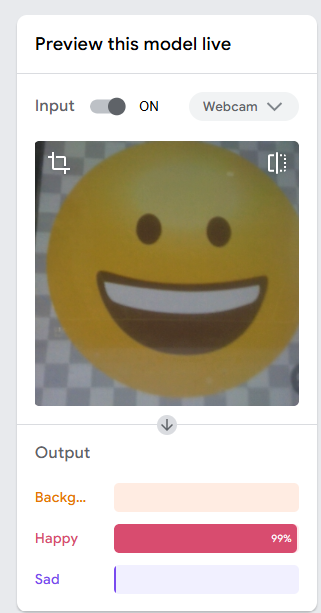
Image credit: Teachable machine
By the end of this activity, students can use the digital tool Teachable Machine to test how a system classifies images captured by a webcam and explain how the AI model recognises features and shows how confident it is in its prediction.
Safety note: Before using Teachable Machine, review the safety guidance in Can AI guess your emotion? (opens in a new window) and avoid using identifiable student images or personal data.
Discuss emotions: Show faces or characters and ask students how they know someone is happy, sad, angry or surprised. List the key facial features together.
Spot patterns in features: Create a simple table of emotions and features (smile, eyebrows, eyes). Compare these features with emojis to notice similarities.
Test a pre made AI model: Use this pre-made model (opens external website in a new window) in Teachable Machine to test how well AI recognises a happy or sad emoji. (You will need a device with a webcam.) Hold printed or drawn emojis in front of the webcam and observe the prediction. Ask: ‘What features do you think AI is using to work out what emotion is shown?
Train a simple AI model: Demonstrate how to record images for three output classes: background, happy and sad. Train the Teachable Machine model and test it with printed or drawn emojis.
Students create or extend an AI model: Provide access to Teachable Machine. Students add a new emotion (for example, surprised or angry) or create a simple model of their own using printed or drawn images.
For information about how to train an AI model and relevant safety information, refer to the lesson Can AI guess your emotion? (opens in a new window)
Evidence of learning
You might notice that students:
- identify important features or patterns in images, text or speech, and explain why these matter for how an AI system works
- compare an AI system’s prediction, classification or translation with their own ideas and explain what may have influenced the result
- notice patterns and differences in the data or examples used, and describe how these affect the system’s response
- suggest why an AI system was or was not confident, accurate or useful in a particular task.
Students are developing an understanding of how AI works when they can describe the important features or patterns in data, explain why those features matter and reflect on how an AI system used patterns to make a prediction, classification or translation.
Common misconceptions or errors to watch for
- Thinking AI is ‘magic’ rather than understanding it works by finding patterns in data
- Using too little or limited training data or a small number of words when testing translation examples
- Assuming AI is always correct, rather than checking whether its prediction, classification or translation makes sense.
Address these explicitly during modelling and discussion.
Artificial intelligence embedded in Years 3-4 Digital Technologies
These examples illustrate the connection between content descriptions and the teaching activities in this guide.
| Digital systems that autocomplete |
|---|
Relevant ACARA content descriptions
Example in practice
|
| Using Teachable Machine |
|---|
Relevant ACARA content descriptions
Example in practice
|
| Using Scratch 3.0 AI Blocks |
|---|
Relevant ACARA content descriptions
Example in practice
|
Artificial intelligence in Years 5–6
Expectation for this band
When AI is used as a context for learning, students can:
- identify different types of AI applications, including systems that recognise information, make predictions or generate content
- select data to train an AI model, test how well it classifies examples and discuss why some classifications may be accurate or inaccurate
- create a simple program in Scratch that mimics the behaviour of an AI application
- explore how computers recognise images by using pixels, patterns and labelled data
- describe how well an AI solution meets its purpose and identify its strengths and limitations.
The focus is on exploring how AI systems recognise speech, text and images, how they use data to make classifications and predictions, and how their outputs can be tested and evaluated.
Note: Students may be familiar with generative AI tools that create text, images or audio. Discussing these tools can provide additional context for AI learning. However, direct student use of generative AI may be restricted by age requirements and school policies.
What this looks like in practice
Students use and learn about AI when they:
- explore AI tools that recognise speech and text (for example translation apps, SMS predictive text or sentiment analysis tools) and discuss how these systems use patterns in language to generate outputs
- select data to train an AI model, test how well it classifies examples, and discuss why some classifications may be accurate or inaccurate
- create a simple program in Scratch that mimics an AI application (such as translation, sentiment analysis or speech recognition), using input, branching, iteration and variables
- design a simple chatbot by anticipating the different questions a user might ask and creating response branches that repeat until the user ends the conversation
- explore how computers recognise images by using pixels, patterns and labelled data, showing how AI learns to classify objects and solve real-world problems
- describe how well an AI solution meets its purpose, explain whether it is fair and useful for users, and suggest improvements based on its impact on the broader community.
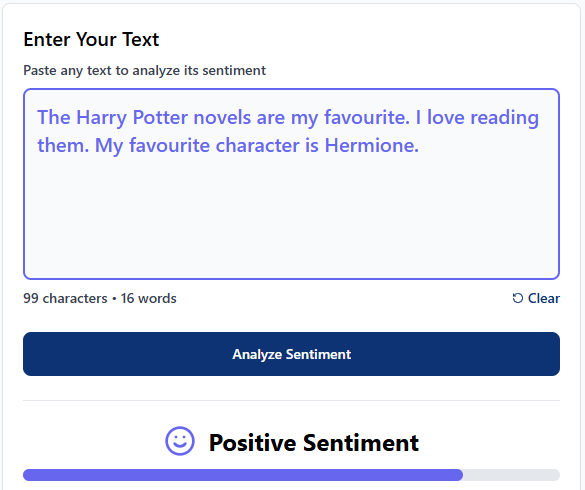
Image credit: Free Text Sentiment Analysis
Learning hook: Provide examples of online reviews for students to classify as positive, neutral or negative. Introduce the term ‘sentiment’ and explain that AI systems can analyse text to identify whether opinions are positive, negative or neutral.
Task: Students complete an unplugged activity by sorting descriptive words into positive, neutral and negative categories.
Students then use some of these words to write a short fictional review. They paste their review into Linkbreakers’ Free Text Sentiment Analysis (opens external website in a new window) tool and compare the tool’s classification with their own judgement.
Discuss how a simple computer program could recognise sentiment by looking for keywords.
Students create a Scratch program using an Ask block. The program checks whether the answer contains words from a prepared list:
- If the answer contains a positive word, output ‘Your review is positive.’
- If the answer contains a negative word, output ‘Your review is negative.’
- If the answer contains a neutral word, output ‘Your review is neutral.’
- Otherwise, output ‘I am not sure.’
Reflection: Students test and evaluate their program. They identify limitations of keyword-based sentiment analysis, such as:
- a review containing both positive and negative words
- phrases such as ‘not good’ being interpreted as positive because the word ‘good’ is detected
- words not included in the program’s lists not being recognised
- the program using fixed rules and keyword lists, whereas AI sentiment analysis tools learn patterns from large amounts of data.
Exit ticket: Give one example of a review that might confuse your Scratch program and explain why.
Resources: Free Text Sentiment Analysis (opens external website in a new window)
Evidence of learning
You might notice that students:
- test an AI system with different examples and discuss when it works well and when it makes mistakes
- compare their own judgement with an AI system’s output and explain any differences
- question whether an AI response, prediction or classification is correct, rather than assuming it is always accurate
- identify examples that are difficult for an AI system to classify and explain why
- suggest ways an AI system could be improved by changing the data, rules or examples it uses.
Students demonstrate an understanding of AI when they investigate how AI systems use data and patterns, test and evaluate AI-generated outputs and recognise that AI systems can be both useful and inaccurate.
Common misconceptions or errors to watch for
- Believing that AI understands and thinks in the same way humans do.
- Assuming that AI outputs are always accurate and fair.
- Thinking that AI can work effectively without being trained on examples or data.
Address these explicitly during the task, using questioning and feedback.
Artificial intelligence embedded in Years 5-6 Digital Technologies
These examples illustrate the connection between content descriptions and the teaching activities in this guide.
| Explore AI tools that recognise images, speech and text |
|---|
Relevant ACARA content descriptions
|
| Create a computer program to mimic AI |
|---|
Relevant ACARA content descriptions
Examples in practice
|
| AI and image recognition |
|---|
Relevant ACARA content descriptions
Example in practice
|
| Investigate predictive text |
|---|
Relevant ACARA content descriptions
Example in practice
|
| Evaluating AI solutions |
|---|
Relevant ACARA content descriptions
Examples in practice
|
| Generative AI models |
|---|
Relevant ACARA content descriptions
Example in practice
|
Artificial intelligence in Years 7-8
Expectation for this band
Students explore key concepts related to AI when they:
- investigate how bias can occur when data does not adequately represent the people, situations or contexts for which an AI system is intended
- investigate how hardware components, such as processors, memory and storage, affect the performance of AI-enabled systems
- use prompts to generate content with AI tools and refine outputs through an iterative process
- evaluate AI-generated content for accuracy, relevance and suitability for a particular audience or purpose
- investigate how AI-generated content can be misleading, inaccurate or intentionally deceptive
- apply strategies for using AI responsibly, including verifying information, protecting privacy and acknowledging the use of AI-generated content.
In Years 7 and 8, students develop an understanding of how AI systems use data to identify patterns and generate outputs. They explore how AI systems work, create with AI tools, and examine the risks and responsibilities of AI use.
What this looks like in practice
Students understand about AI when they:
- explore how AI is used in information systems such as biometric security, streaming recommendations and virtual assistants by identifying the data (input), processing and outputs involved
- sort information systems into ‘uses AI’ and ‘does not use AI’, discussing the data each system uses and whether it makes intelligent decisions or predictions from that data
- train and create an AI model to recognise cartoon images of people to see if the AI model recognises cartoon faces wearing glasses, sunglasses or no glasses
- analyse common phishing scams and create rules that an AI system could use to identify and block fraudulent messages
- use a progressive series of prompts with generative models to refine output to improve its correctness (for example by asking the model to explain each step), query responses that are unclear, and ask for alternative solution methods when learning how to solve a mathematical problem.
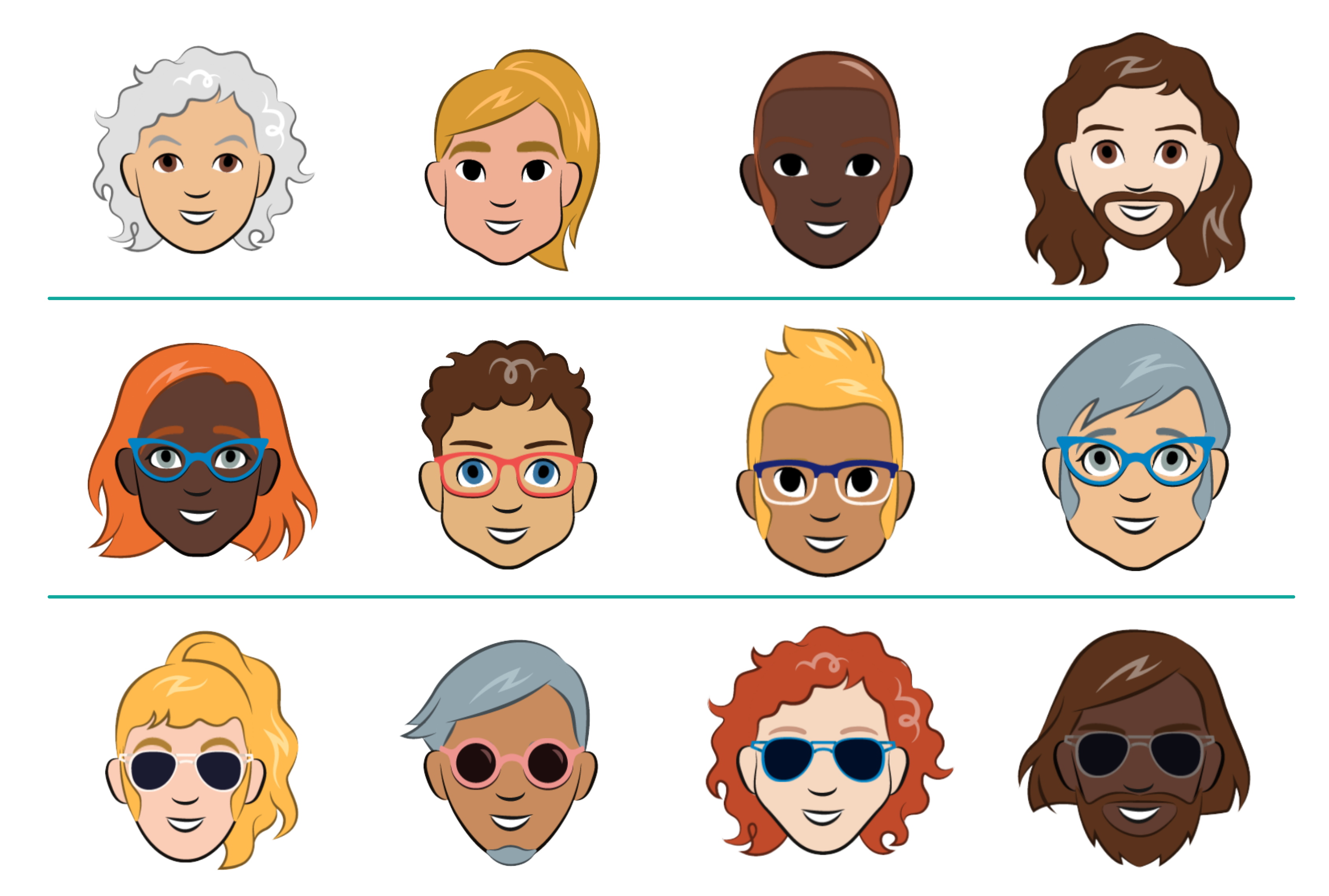
By the end of this lesson, students will be able to create, train and test their machine learning model using an online AI tool.
Retrieval: Have you ever noticed that passport photos are usually taken without glasses? How can an AI system be used to recognise passengers at passport control, and would glasses affect its accuracy?
Create an AI model: Explain that students will train and create an AI model to recognise cartoon images of people to see if the AI model recognises cartoon faces wearing glasses, sunglasses or no glasses.
Organise students into small groups and provide the testing and training images (.zip) (opens in a new window)
- Students keep their testing and training images separate.
- Each group cuts out the training images sorted into groups: cartoon faces wearing glasses, sunglasses or no glasses.
- The training images can be kept aside until later.
Explain the reasons for using cartoon images and not photographs or images of themselves. Discuss the potential misuse of personal images when uploading images of ourselves or friends on websites. Instruct students not to record images of themselves or others via the webcam, or upload images.
Provide access to the Teachable Machine (opens external website in a new window) application.
- Select Get started, then select Image project as students are teaching their AI based on images.
- Add a label for each Class. Students will need three classes: glasses, sunglasses and no glasses. These are the buckets they will be adding the training images to via a webcam.
Safety note: Protect student privacy by avoiding the use of identifiable student images or personal data. Review the safety guidance in AI image recognition – exploring limitations and bias before using Teachable Machine.
Testing AI: Follow the steps below to test your AI model.
- Once training is done, students can test their AI model using the test images provided. This gallery of test faces has more diverse skin colours than in the training dataset.
- Students can discuss the accuracy of their model.
For information about how to train an AI model and relevant safety information, refer to the lesson AI image recognition – exploring limitations and bias.
Evidence of learning
You might notice that students:
- gather and sort images to train an AI model
- discuss whether a dataset adequately represents different people, situations or contexts
- recognise when an AI model makes errors and suggest ways to improve it
- compare AI-generated outputs with expected results
- describe how AI systems use information about users, events or situations to make decisions and recommendations
- question why an AI model performs better for some examples than others
- check whether AI-generated information is correct using other sources
- refine prompts to improve the accuracy, relevance or usefulness of AI-generated outputs.
Common misconceptions or errors to watch for
- Believing AI systems always make accurate or objective decisions
- Assuming AI understands information in the same way humans do
- Not recognising bias in AI-generated content
- Not acknowledging when AI has been used to create or modify content
- Accepting the first AI-generated response without refining prompts or checking the output.
Address these explicitly during the task, using questioning and feedback.
Artificial intelligence embedded in Years 7-8 Digital Technologies
These examples illustrate the connection between content descriptions and the teaching activities in this guide.
| How AI works |
|---|
Relevant ACARA content descriptions
Example in practice
|
| AI models: data, bias and accuracy |
|---|
Relevant ACARA content descriptions
Example in practice
|
| AI and digital systems |
|---|
Relevant ACARA content descriptions
Examples in practice
|
| AI risks and responsible use |
|---|
Relevant ACARA content descriptions
Examples in practice
|
| AI as a creative partner |
|---|
Relevant ACARA content descriptions
Examples in practice
|
| Explore AI systems |
|---|
Relevant ACARA content descriptions
Example in practice
|
Artificial intelligence in Years 9-10
Expectation for this band
Students explore key concepts related to AI when they:
- examine why AI systems can make mistakes when faced with situations, events or examples they have not previously encountered
- explore how the quality, variety and relevance of data influence the predictions and decisions made by AI systems
- investigate how AI recommender systems use and prioritise data about users’ interests, behaviours and interactions to personalise recommendations and influence user engagement
- explore how users might deliberately provide inputs that cause a generative AI system to ignore its intended instructions, leading to unreliable or unsafe outputs
- explore how outputs from different generative AI tools can be combined to communicate ideas; for example, using AI-generated images, sounds and text to create an interactive animation
- investigate how generative AI can support human creativity by generating ideas, designs or content that people can evaluate, adapt and develop further.
In Years 9 and 10, students develop an understanding that AI systems rely on data to generate predictions, recommendations and create new content. They investigate how data quality, user inputs and system design influence AI outputs; examine the limitations and vulnerabilities of AI systems; evaluate their impacts; and explore how generative AI can support creativity and communication.
What this looks like in practice
Students understand about AI when they:
- investigate how AI systems can make mistakes when faced with unfamiliar situations by analysing image recognition or prediction systems and identifying examples where missing, incomplete or unusual data could lead to incorrect decisions
- explore how the quality, variety and relevance of data influence AI predictions and decisions by evaluating different data sources for an AI traffic-management or route-planning system and justifying which data would improve its performance
- compare AI recommender systems used by video streaming, social media, online shopping and news platforms. Investigate how user preferences, viewing history, ratings and interactions influence recommendations and engagement strategies
- compare how different prompts produce different responses from the same AI system and investigate why some prompts lead to more accurate, useful or unexpected outputs than others
- create a multimodal product using outputs from different generative AI tools; for example, combining AI-generated text, images and audio to communicate an idea, tell a story or explain a concept
- explore how generative AI can be used alongside human expertise to create and refine solutions; for example, generating character concepts with AI and then using them as inspiration when designing a 3D game character.
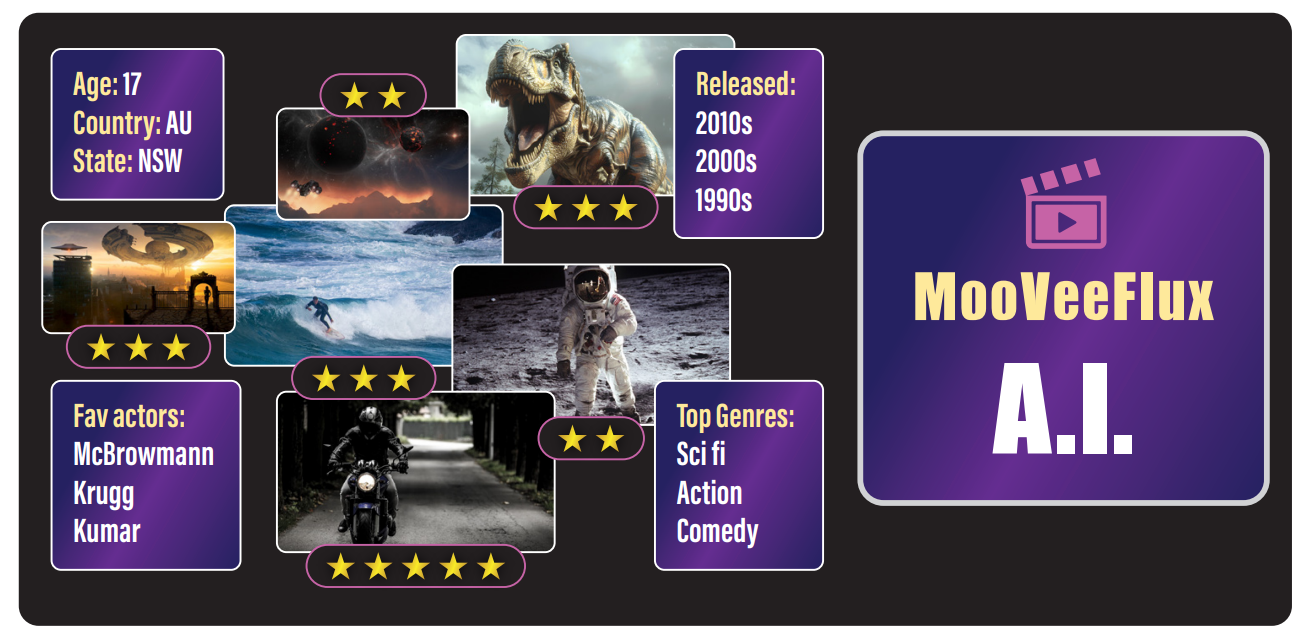
By the end of this lesson, students will be able to explain how AI recommender systems use data about users’ interests, behaviours and interactions to personalise content.
Retrieval: Have you ever noticed videos, songs, products or news stories being suggested to you online? What information about you do you think the system used to make those recommendations?
As a class, create a list of AI recommender systems used in video streaming, online shopping and news platforms.
Introduce AI information systems and discuss the services using the worksheet ‘Recommender systems’ (PDF). (opens in a new window)
- Compare the types of content recommended by different systems and explain why those recommendations may have been made
- Investigate how user data, such as viewing history, ratings, searches and interactions, influences recommendations
- Analyse the strategies recommender systems use to encourage user engagement, such as personalised content and notifications
Ask students the following questions.
- How do you think the system came up with its suggestions? What data might it have used?
- Were the recommendations relevant to you? Why or why not?
- What are the advantages and disadvantages of recommender systems?
Evidence of learning
You might notice that students:
- explain how data influences the predictions, recommendations or outputs generated by AI systems
- identify factors that can affect the accuracy, fairness, reliability or safety of AI systems
- evaluate the role of human judgement when using AI-generated outputs
- describe how AI systems use information about users, events or situations to make decisions and recommendations
- critically analyse the benefits, limitations and potential impacts of AI systems.
Common misconceptions or errors to watch for
- Believing AI systems always make accurate or objective decisions
- Assuming AI understands information in the same way humans do
- Not connecting AI outputs to the types of the data used to train or inform the system
- Using AI-generated content without evaluation or refinement
- Assuming AI systems always operate as intended, not considering that they can be influenced by users or manipulated in some way.
Address these explicitly during the task, using questioning and feedback.
Artificial intelligence embedded in Years 9-10 Digital Technologies
These examples illustrate the connection between content descriptions and the teaching activities in this guide.
| Recognising that data matters and that AI has limitations |
|---|
Relevant ACARA content descriptions
Examples in practice
|
| AI outputs are influenced by inputs |
|---|
Relevant ACARA content descriptions
Examples in practice
|
| AI can potentially be manipulated |
|---|
Relevant ACARA content descriptions
Example in practice
|
| Evaluating existing AI systems |
|---|
Relevant ACARA content descriptions
Examples in practice
|
| Evaluating AI solutions |
|---|
Relevant ACARA content descriptions
Examples in practice
|
| AI as a creative partner |
|---|
Relevant ACARA content descriptions
Example in practice
|
Plan your teaching
Explore sample units and lessons.
These sample units have examples of ways to incorporate AI.
Foundation: Representing data
Years 1-2: Ways we represent data
Years 3–4: Introduction to programming, Programming a simple digital solution
Years 5–6: Programming challenges, Designing a digital solution
Years 7–8: General-purpose programming, Creating a digital solution
Years 9–10: Programming
Use this planning template (opens docx in a new window) to record relevant information as you view a scope and sequence topic for your year level.
Research-informed teaching
Evidence-based approaches
- Unplugged learning
- Critical evaluation: AI outputs
- Worked examples and scaffolding
Unplugged learning
Research from CS Unplugged shows that introducing computing concepts without devices helps students focus on core ideas before adding technical complexity.
What this looks like in practice:
- Begin with an unplugged activity to introduce how AI systems learn.
- Use simple models, role-play or hands-on activities to demonstrate how AI identifies patterns and makes predictions from data.
- Prompt students to explain how AI reached its decisions, identify any errors, and discuss how the model could be improved.
- Introduce digital AI tools once students understand that AI systems learn from data, make predictions, and improve through testing and refinement.
Example:
Explain that students will model how an AI learns to recognise and classify images by acting as a ‘human computer’. Organise students into groups of four, with two students in each group forming the Images Team and two students forming the Algorithm Team.
- The Images Team selects three or four simple objects (such as a cat, dog, car or tree) and draws five different examples of each on separate cards to create the training data.
- The Algorithm Team creates a label for each object, examines the labelled images to identify common features (for example, whiskers, wheels, leaves), and writes simple rules to help classify each image.
While the rules are being developed, the Images Team draws new variations of the same objects. These new images are then presented to the Algorithm Team, who use their rules to classify them. Students discuss any incorrect classifications and refine the rules, demonstrating how AI models improve through testing and refinement.
This activity models how AI is trained using labelled data, tested on new examples, and improved by refining its rules when mistakes are identified. Google’s Teachable Machine (opens external website in a new window) is a suitable digital tool to use in follow-up learning.
Critical evaluation: AI outputs
Research published by the Australian Research Council Centre of Excellence for the Digital Child, suggests that AI literacy involves more than learning to use AI tools. Students need opportunities to question, verify and evaluate AI-generated responses, recognising that outputs may be inaccurate, incomplete or biased. Structured discussion and evaluation help students develop critical thinking, informed decision-making and responsible AI use.
What this looks like in practice:
- Generate an AI response to a class question or task.
- Ask students to decide what is accurate, what should be checked, and what information is missing.
- Encourage students to explain their reasoning using evidence from trusted sources or from prior learning.
- Revise the prompt or compare multiple AI responses to explore how different prompts produce different results.
Example:
Students compare two AI-generated story openings created from similar prompts, one focusing on a male character and the other on a female character. They identify differences in the language, roles and characteristics assigned to each character, discuss whether these reflect gender stereotypes, and explain how bias in training data can influence AI-generated outputs. The class then considers how the prompts or responses could be revised to produce fairer and more balanced results, reinforcing the importance of critically evaluating AI-generated content and recognising that AI outputs may not always be accurate, complete or unbiased.
Worked examples and scaffolding
Research synthesised by the Australian Education Research Organisation shows that modelling worked examples and gradually reducing support improves learning of complex procedures.
What this looks like in practice:
- Conduct a risk assessment and check the school’s AI policy and acceptable use guidelines before using an AI tool with students.
- Model how to write a clear prompt for a generative AI tool.
- Ask students to compare the AI response with the intended outcome and identify areas for improvement.
- Support students to refine their prompts by adding detail, context or constraints. Encourage students to reflect on how changes to the prompt influenced the quality and accuracy of the AI-generated response.
Example:
A teacher explicitly models how to begin with a simple prompt to learn about a topic or concept. As they review the AI-generated response, they think aloud about what is missing, unclear or not quite meeting the intended purpose. The teacher then demonstrates how to refine the prompt by adding more detail, context or constraints, explaining the reasoning behind each change. Throughout the process, students are invited to suggest ways to improve the prompt and predict how those changes might influence the AI response. The class compares the original and revised outputs and discusses how prompt refinement improved the quality, accuracy and relevance of the information.
Check understanding
- 1–2: Assessment task
- 3-4: Assessment task
- 5-6: Assessment task
- 7-8: Rubric and assessment task
- 9-10: Assessment task
Teachers can assess student learning in a range of ways, including through checklists, observations, rubrics and student work samples. The examples below focus specifically on assessing students’ understanding of algorithms, which is one part of computational thinking.
- Foundation and Years 1–2: Can an AI recognise what you are drawing? Incorporate this assessment task after students have used AutoDraw (opens external website in a new window) to explore how AI systems recognise images and visual representations. Students create simple weather data icons and test how accurately AI interprets their drawings, comparing how AI and humans recognise and classify images. An exit ticket can be used that asks students to respond verbally or on a mini whiteboard to one or two prompts:
- What is one feature that could help AI tell the difference between a bee and a fly?
- Did you trick AI today? Answer ‘yes’ or ‘no’ and explain why you think this happened.
- Years 3–4: Can AI guess your emotion? In the assessment section, a suggested task is for students to evaluate how well an AI emotion recognition system identifies their group’s emotions. Students use screen captures as evidence of the AI’s performance and assign a star rating based on its accuracy.
- Years 5–6: Feral cat spotter (MS Word) (opens in a new window) . In this assessment task, students take on the role of a team using an AI image-recognition system to monitor bilby habitat and protect bilbies from attacks by feral cats. Students describe the dataset needed to train the AI model so that it can accurately identify and distinguish between bilbies and feral cats.
- Years 7–8: Rock, Paper, Scissors AI! The assessment section of this lesson provides advice on assessing students’ knowledge of algorithms, AI and bias and includes a rubric.
- Years 9–10: Systems Thinking and AI applications. This resource provides a worked example analysing an information system for a shark-spotting drone to demonstrate the analysis process. Students then apply the same process using a template to analyse a different real-world solution with an AI component.
Deepen your understanding
Explore these resources for further background to help teach about AI:
- Explainer videos (ESA) Introduce key concepts in AI
- Lesson plans (ESA) A range of lessons to suit all levels
- Explore AI in education (ESA) Free, self-paced modules including generative AI readiness
Supporting resources
Children and Generative Artificial Intelligence (GenAI) in Australia: The Big Challenges (Australian Research Council Centre of Excellence for the Digital Child) Challenges (PDF) (opens external website in a new window) and issues in terms of everyday use of Generative AI tools
The Australian Framework for Generative Artificial Intelligence (AI) in Schools (opens external website in a new window) (Australian Government Department of Education) Guides the responsible and ethical use of generative AI tools in ways that benefit students, schools and society
Curriculum connection: Artificial intelligence (AI) (opens external website in a new window) (ACARA) Explore connections to the Australian Curriculum